



Top Cloud Based CRM Software Tools of 2026
Most CRM buying decisions go wrong in one of two ways. A business pays for a cloud based CRM software platform packed with features it never touches, or it picks something cheap and hits a wall the moment the team grows past ten people. Both mistakes come from the same root cause: choosing software based on its feature list instead of how it actually fits the way a team works.
The cost of skipping a CRM entirely is usually worse than either mistake. Leads sit unanswered because no one owns the follow-up. Deal history lives in one rep’s inbox instead of a shared system. Forecasts turn into guesses. A CRM fixes this, but only if the platform matches the team’s size, budget, and process.
This guide compares the 10 leading cloud based CRM platforms for 2026 on pricing, features, AI capabilities, and real-world fit, based on publicly available pricing pages, product documentation, and our own implementation work across 4,000+ CRM projects.
⚡
Quick Summary
Cloud based CRM is CRM software you access online instead of installing on your own servers, which is why it has become the default choice for most businesses. If you’re a small team on a tight budget, Zoho CRM or HubSpot’s free tier will cover your needs. If your team has passed 50 seats and needs deep customization, Salesforce or Dynamics 365 are worth the higher cost and setup time. Everything below is here to help you figure out which side of that line your business falls on, and which platform fits once you know.
✓
Key Takeaways
01
Cloud based CRM costs less upfront than on-premise because there’s no server to buy, just a monthly per-user fee that scales with your team.
02
Zoho CRM, Freshsales, and HubSpot all offer usable free tiers, so small teams can start without spending anything before they know what they actually need.
03
AI features like lead scoring and deal forecasting have moved into mid-tier plans across most platforms; they’re no longer locked to enterprise pricing.
04
Salesforce and Dynamics 365 cost more mainly because of implementation and customization depth, not just brand markup, which matters if you don’t need that depth.
05
Picking a CRM off a feature list is how most bad decisions happen. Run a real trial with your own pipeline data before signing an annual contract.
What is Cloud Based CRM Software?
A cloud based CRM is customer relationship management software hosted on a vendor’s servers and delivered over the internet, rather than installed on a company’s own hardware. Users log in through a browser or mobile app, and the vendor handles maintenance, updates, and infrastructure.
This is different from on-premise CRM, where a business buys servers, installs the software locally, and manages upgrades and security in-house. Cloud CRM removed that overhead, which is why it now makes up the large majority of new CRM deployments.
The rise of AI has also changed what CRM software can do. Over 70% of CRM platforms now include AI-powered features like predictive lead scoring, automated data entry, and conversational chatbots. Companies using AI-integrated CRMs are 83% more likely to exceed their sales targets compared to those using traditional tools.
Benefits of Cloud Based CRM
The technical setup matters less than what it actually changes for a business day-to-day. These are the benefits that show up fastest after switching to a cloud Based CRM.
1. Lower Upfront Cost
There’s no server to buy, and no IT team needed to install and maintain one. Most cloud Based CRMs run on a monthly per-user fee, which turns a large capital expense into a predictable operating cost. This is a big part of why cloud CRM has become the default choice for small and mid-sized businesses.
2. Faster Setup Time
A cloud CRM can go from signup to first login in minutes, not weeks. Simpler platforms like Pipedrive or Freshsales can have a small team fully onboarded within days, since there’s no hardware to configure or software to install on individual machines.
3. Automatic Software Updates
New features, security patches, and bug fixes roll out on the vendor’s schedule, not the customer’s. Nobody on the team has to plan downtime for an upgrade or manually install a new version. This also means every user is always working on the same version of the software.
5. Access From Anywhere
Since the CRM runs in the browser or through a mobile app, reps can update deals from a client site, check pipeline status from home, or pull up a contact’s history before a call, all without a VPN or office connection. This matters more now that hybrid and remote sales teams are the norm rather than the exception.
6. Built-In Data Security
Cloud vendors invest in security infrastructure most individual businesses couldn’t replicate on their own, including encryption, regular backups, and compliance certifications like SOC 2 or ISO 27001. Data is also automatically backed up across multiple locations, which reduces the risk of losing records to a single hardware failure.
7. Easy Team Scaling
Adding ten new users to a cloud based CRM is a matter of adjusting the subscription, not provisioning new hardware. This makes it straightforward to scale a CRM up during growth, or down if a team shrinks, without renegotiating an infrastructure contract.
Cloud Based CRM vs On-Premise CRM
The short version: cloud based CRM costs less upfront, deploys faster, and updates automatically, while on-premise CRM gives a business full control over data storage but requires its own servers, IT staff, and manual upgrades. Most small and mid-sized businesses choose cloud CRM for exactly this reason, while a small number of enterprises with strict data residency rules still run on-premise systems.
We’ve covered this comparison in full detail, including cost breakdowns and migration considerations, in our dedicated blog: On-Premise vs Cloud Based CRM
Why Your Business Needs a CRM in 2026
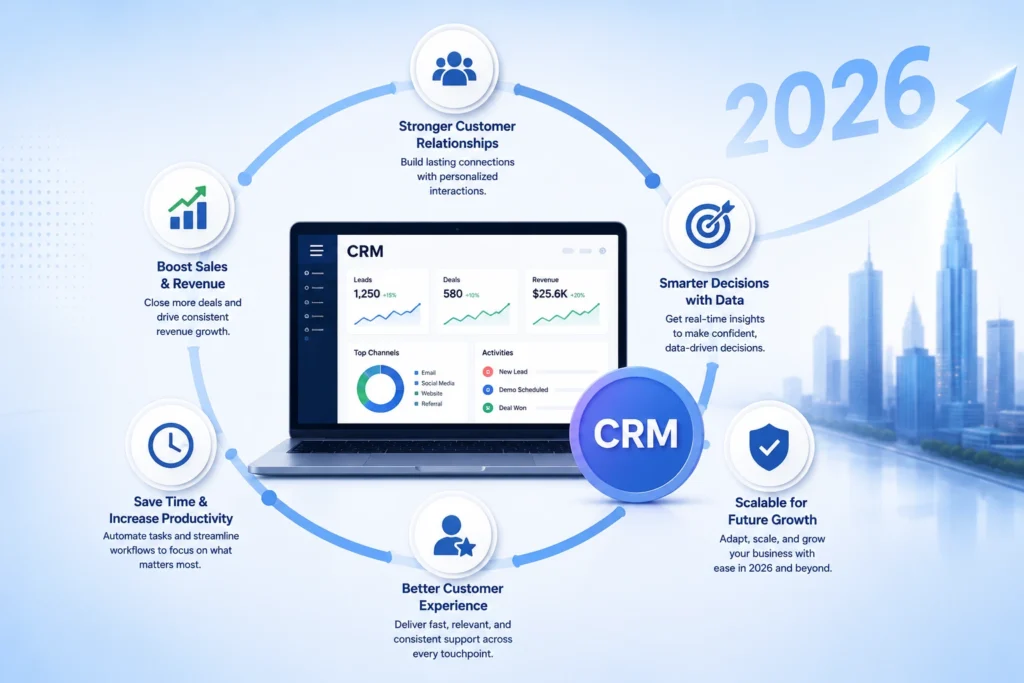
Businesses running on spreadsheets and disconnected inboxes tend to hit the same wall eventually. Leads go cold because no one owns the follow-up. Deal history lives in one rep’s inbox instead of a shared system. Forecasting becomes a guess instead of a calculation.
A CRM fixes this by giving every team member the same view of every customer relationship. It also changes what’s possible with automation. Industry research from firms like Gartner and Forrester has consistently linked structured CRM adoption to shorter sales cycles and better lead conversion, particularly when paired with built-in AI features like lead scoring and next-best-action recommendations.
Signs You’ve Outgrown Your Current Setup
- Contacts and deals are tracked in Excel or Google Sheets with no shared pipeline view
- Follow-ups depend on individual memory instead of automated reminders
- Customer data is split across email, chat, support tickets, and spreadsheets
- Monthly or quarterly revenue forecasts are educated guesses, not calculations
- New sales reps take weeks to ramp up because process knowledge lives in people’s heads, not in a system
- Managers can’t see deal status without asking the rep directly
Key Features to Look For in a CRM Tool
Most CRM feature lists read the same because most CRMs offer the same basics. What actually separates a good platform from a bad one is how well these features work together, not whether they exist on a spec sheet.
1. One Unified Database
Every CRM promises a “centralized database,” but the real test is whether a rep can open one contact and see every email, call, deal, and support ticket without switching screens. If your team is still tabbing between Gmail, a spreadsheet, and a support tool to piece together a customer’s history, the database isn’t actually centralized; it’s just stored in one place.
2. Visual Deal Pipeline
A pipeline view should answer one question instantly: what needs to happen next, and who owns it. Drag-and-drop boards do this well because they turn abstract deal stages into something visual and immediate. If a manager has to open five deals individually to understand where the month stands, the pipeline isn’t doing its job.
3. Automated Follow-Up Tasks
Workflow automation exists to catch the things people forget: a lead that’s gone quiet, a deal stuck in the same stage for two weeks, a task nobody claimed. The best automation setups trigger based on behavior, not just time, so a lead gets a follow-up because they opened an email three times, not because a week passed on a calendar.
4. AI Sales Assistant
AI-assisted selling has become a checkbox feature, so it’s worth asking what the AI is actually predicting. Deal closure probability, email sentiment, and next-best-action recommendations are useful because they change what a rep does that day. A chatbot that answers FAQs is not the same thing, even though both get marketed as “AI.”
5. Custom Sales Reports
Generic reporting templates rarely match how a specific business tracks revenue. Custom reporting matters because it lets a sales leader build dashboards around the metrics that matter to their process, win rate by lead source, average deal size by rep, conversion rate by campaign, instead of settling for whatever the vendor decided to prioritize.
6. Seamless Tool Integrations
Native integrations decide whether data moves automatically or gets copied and pasted between systems. A CRM that connects cleanly to email, marketing tools, and ERP software removes the manual entry that causes most data quality problems in the first place. Before buying, it’s worth confirming integrations are native and not routed through a third-party connector that can break.
7. Full Mobile Access
A lot of “mobile apps” are really just mobile dashboards, good for checking numbers, useless for actually updating a record. Field sales teams need to log a call, update a deal stage, or add a note from a phone with the same functionality as the desktop version. That gap between viewing and doing is where most mobile CRM apps fall short.
Top 10 CRM Software Tools of 2026
1. Zoho CRM
Zoho CRM is one of the most feature-rich and cost-effective CRM platforms on the market, and arguably the most underrated. Used by over 250,000 businesses across 180 countries, it offers an omnichannel customer engagement platform that covers email, phone, live chat, social media, and web forms in a single interface.
What sets Zoho CRM apart is Zia , its built-in AI assistant that predicts deal closure probability, detects anomalies in sales data, identifies email sentiment, and recommends the optimal time to contact a lead. Combined with an affordable pricing structure and a free tier for small teams, Zoho delivers enterprise-grade capabilities at SMB-friendly pricing.
Pricing: Free (3 users) | Standard $14 | Professional $23 | Enterprise $40 | Ultimate $52 (per user/month, annual billing)
PROS
- Highly customizable workflows, modules, and dashboards
- Built-in AI (Zia) included even in mid-tier plans
- 500+ third-party integrations including Google, Microsoft, Slack
- Strong mobile CRM app for field teams
- Switch tool for easy data migration from other CRMs
- Advanced security: IP restrictions, audit logs, 2FA
- Seamlessly integrates with the full Zoho ecosystem (40+ apps)
CONS
- UI has a learning curve for first-time CRM users
- Free plan limited to 3 users
- Some advanced automation features require Enterprise plan
2. Salesforce
Salesforce is the most customizable, extensible, and feature-complete CRM platform available. With the Salesforce AppExchange offering thousands of integrations and the powerful Einstein GPT AI engine, Salesforce can support virtually any sales process at any scale.
In 2026, Salesforce’s Agentforce platform brings autonomous AI agents into the CRM, with early adopters reporting that AI agents now autonomously resolve 60–70% of routine customer queries. This makes Salesforce not just a CRM, but an intelligent revenue operations platform.
Also Read:- Zoho CRM Vs Salesforce
Pricing: Starter $25 | Pro Suite $100 | Enterprise $165 | Unlimited $330 (per user/month)
PROS
- Unmatched customization — workflows, dashboards, custom apps
- World’s largest CRM app marketplace (AppExchange)
- Einstein AI provides predictive insights and automation
- Scales from startup to global enterprise
- Deep integration with ERP, marketing, and service platforms
CONS
- High total cost of ownership — licensing + implementation + training
- Complex setup often requires dedicated admin or consulting support
- Mobile app less capable than the desktop experience
- Can be overkill for SMBs with simpler needs
3. HubSpot CRM
HubSpot’s free CRM is the most generous on the market, and what’s made it the go-to starting point for thousands of businesses. It integrates seamlessly with HubSpot’s Marketing Hub, Sales Hub, and Service Hub to create a full-funnel customer platform. The interface is highly intuitive, which keeps adoption rates high and reduces onboarding time.
HubSpot is particularly strong for inbound-focused companies that want their CRM, email marketing, landing pages, SEO tools, and customer support all under one roof. The trade-off is cost, premium plans escalate quickly, and advanced reporting or automation requires paid tiers.
Also Read:- Zoho CRM Vs Hubspot
Pricing: Free | Starter $20 | Professional $800/month | Enterprise $3,600/month
PROS
- Best-in-class free tier for small teams
- Intuitive UI with minimal learning curve
- Native integration with Marketing, Sales, and Service Hubs
- Strong email tracking and sequence automation
- Google Workspace and Microsoft 365 integrations
CONS
- Advanced features (custom reporting, automation) locked behind expensive paid tiers
- Cost escalates significantly as you scale
- Less customizable than Zoho or Salesforce at equivalent price points
4. Microsoft Dynamics 365
Microsoft Dynamics 365 is the only major platform that seamlessly unifies CRM and ERP capabilities in a single suite. For businesses deeply invested in the Microsoft ecosystem — Office 365, Teams, Outlook, Power BI, Azure — Dynamics 365 delivers native, deep integration that eliminates context-switching and data silos.
With Microsoft Copilot AI embedded throughout, Dynamics 365 brings AI-assisted selling, automated meeting summaries, email drafting, and sales forecasting directly into the tools your team already uses every day.
Pricing: Sales Professional $65 | Sales Enterprise $95 | Customer Engagement Plan $115 | per user/month
PROS
- Native integration with entire Microsoft ecosystem
- Unified CRM + ERP in one platform
- Microsoft Copilot AI for intelligent selling assistance
- Supports both cloud and on-premises deployment
- Power BI integration for advanced analytics
CONS
- Complex implementation — typically requires specialist support
- Steeper learning curve than most alternatives
- Integration with non-Microsoft tools takes more effort
- Higher entry price vs. Zoho or Pipedrive
5. Pipedrive
Pipedrive is built with one philosophy: maximize output while minimizing input. Its visual drag-and-drop pipeline is one of the most intuitive deal management interfaces available, making it a favourite for sales-driven SMBs that want immediate clarity over their pipeline without configuration overhead.
Pipedrive’s AI Sales Assistant monitors deal activity and proactively alerts reps when action is needed — helping teams stay on top of follow-ups without manual tracking.
Pricing: Essential $24 | Advanced $44 | Professional $64 | Power $79 | Enterprise $129 (per user/month)
PROS
- Best-in-class visual pipeline interface
- AI assistant for deal follow-up and activity recommendations
- Fast setup — usable within hours
- Strong email integration and tracking
- Highly customizable deal stages and fields
CONS
- Limited marketing and customer support features
- Not ideal for teams needing deep customization
- Reporting is less powerful than Salesforce or Zoho
6. Freshsales
Freshsales delivers a polished, sales-focused CRM experience at one of the most competitive price points in the market. Its Freddy AI assistant handles lead scoring, deal insights, and next-step recommendations, making AI-assisted selling accessible even for smaller teams with tight budgets.
Being part of the Freshworks suite also means easy integration with Freshdesk (customer support) and Freshmarketer (marketing automation) for teams that want a bundled solution.
Pricing: Free (3 users) | Growth $9 | Pro $39 | Enterprise $59 (per user/month)
PROS
- Most affordable AI-included CRM on the market
- Built-in phone and email tools
- Clean, modern UI with quick onboarding
- Integrates well with other Freshworks products
CONS
- Lacks advanced customization for complex enterprise workflows
- Integration ecosystem smaller than Salesforce or Zoho
- Reporting depth limited on lower-tier plans
7. Monday CRM
Monday CRM combines project management flexibility with CRM capabilities, making it a strong choice for service businesses that manage both customer relationships and delivery workflows. Its highly visual interface allows teams to build custom CRM pipelines, dashboards, and automations that match exactly how they work — not a predefined vendor template.
Also read: Zoho CRM Vs Monday CRM
Pricing: Basic $15 | Standard $20 | Pro $33 | Enterprise (custom) — per user/month
PROS
- Extremely flexible, build CRM workflows exactly as you need
- Powerful dashboards with cross-board data views
- Strong automation and task management
- Great for teams that also manage projects and delivery
CONS
- No free plan
- Deep sales-specific features (email sequences, AI forecasting) are less mature than dedicated CRMs
- Can become complex to maintain as boards multiply
8. SugarCRM
SugarCRM is designed for businesses with complex, highly specific CRM requirements that off-the-shelf platforms can’t accommodate. It offers both cloud and on-premises deployment, making it one of the few options for organizations with data sovereignty requirements. SugarPredict brings AI-powered lead scoring and churn prediction to its enterprise customers.
Pricing: Sell $49 | Serve $80 | Enterprise $85 | Market $1,000/month (per user/month)
PROS
- Deep customization of workflows, reports, and interfaces
- Cloud and on-premises deployment options
- Strong for complex B2B sales cycles
- SugarPredict AI for lead and churn scoring
CONS
- Requires significant technical expertise to configure
- Higher implementation cost than comparable tools
- Smaller partner ecosystem than Salesforce or Zoho
9. Oracle NetSuite
Oracle NetSuite CRM is natively built into the NetSuite ERP suite, making it the strongest choice for businesses that need CRM and back-office operations (inventory, order management, finance) fully unified. Every customer interaction is linked to order history, payment records, and fulfilment data, giving sales and service teams unparalleled context.
Pricing: Custom quote. Typically includes a base platform fee plus per-user pricing.
PROS
- CRM natively unified with ERP, no integration required
- Full customer timeline: orders, quotes, payments, support
- Strong for e-commerce and product-based businesses
- Robust sales forecasting and commission management
CONS
- Expensive, typically suited for established mid-market and enterprise
- Report customization is complex
- Support quality varies, and premium support costs extra
10. Zendesk Sell
Zendesk Sell is a sales CRM built to integrate naturally with Zendesk’s industry-leading customer support platform. For B2B teams where sales and support are closely linked and a support ticket frequently affects a renewal or upsell, Zendesk Sell provides a unified customer record that both sales and support teams can act on. Its interface is clean and requires minimal training.
Pricing: Sell Team $19 | Sell Growth $55 | Sell Professional $115 (per user/month)
PROS
- Seamless integration with Zendesk Support
- Clean UI requiring minimal onboarding time
- Strong email intelligence and prospecting tools
- Good sales reporting and pipeline analytics
CONS
- Advanced features available only on higher-tier plans
- Less customizable than Zoho or Salesforce
- Best value only when paired with Zendesk Support suite
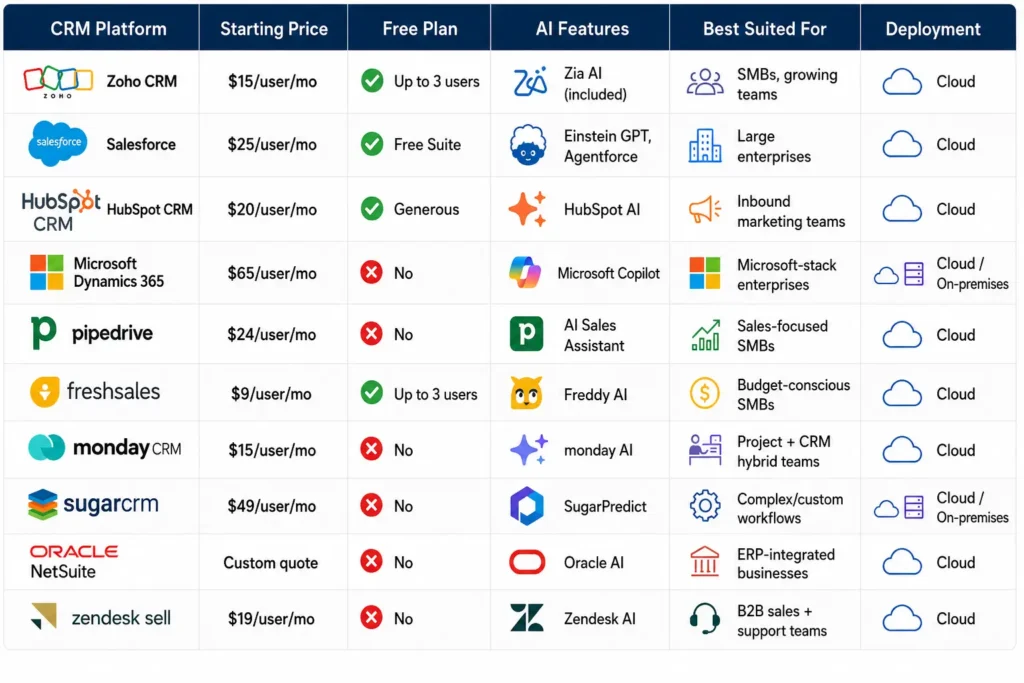
Side-by-Side CRM Comparison Table
How to Choose the Right CRM
1. Start with team size and complexity. A five-person sales team and a 200-person revenue org need fundamentally different platforms. Smaller teams generally do better with simpler, faster-to-deploy tools like Pipedrive or Freshsales, while larger operations benefit from the depth of Salesforce or Dynamics 365.
2. Identify your primary use case. Sales-only teams should prioritize pipeline and forecasting tools. Teams that blend marketing and sales benefit more from HubSpot’s connected hubs. Businesses tracking both delivery and customer relationships often do better with Monday CRM’s flexible boards.
3. Calculate total cost of ownership, not just license price. A cheaper monthly rate can end up costing more once implementation, training, and add-on modules are factored in. This is where platforms like Salesforce and NetSuite often surprise buyers who only budgeted for the sticker price.
4. Check integration compatibility. List the tools your team already relies on- email, calendar, marketing automation, ERP- and confirm the CRM has native or well-supported connections to each one.
5. Test before committing. Most platforms on this list offer free trials or free tiers. Run an actual pipeline through the trial with real deals before signing an annual contract.
6. Implementation plan, not just the purchase. Budget time and resources for data migration, user training, and workflow setup. This is often where CRM projects succeed or fail, independent of which platform is chosen.
Which CRM Software is Right for You?
There’s no single best CRM, only the best fit for a given team’s size, budget, and workflow. Zoho CRM tends to work well for small and mid-sized businesses that want strong AI and customization without enterprise pricing. Salesforce fits large organizations that need maximum flexibility and are prepared to invest in implementation. HubSpot suits inbound marketing-led teams, Pipedrive suits sales teams that want visual simplicity, and NetSuite suits product businesses that want CRM and ERP in one system.
The most reliable way to choose is to shortlist two or three platforms based on team size and use case, run a real trial with actual data, and evaluate total cost of ownership before signing a contract.
Who is CRM Masters?
CRM Masters is a CRM implementation company that helps businesses simplify their sales, marketing, and customer operations. Since 2016, we’ve been helping organizations implement, customize, integrate, and optimize CRM solutions that align with their unique business needs. Backed by a team of 100+ certified CRM experts, we’ve successfully delivered CRM projects across 15+ industries, serving businesses in India, the USA, the UK, and other global markets. Contact us to know more.
FAQ
Q1. Is a cloud based CRM safe for storing customer data?
Ans. Yes, when the vendor holds recognized certifications like SOC 2 or ISO 27001 and offers role-based access controls. Most reputable CRM vendors invest more in security infrastructure than an individual business would be able to on its own.
Q2. What’s the difference between cloud based CRM and SaaS CRM?
Ans. They’re effectively the same thing. Cloud CRM is delivered as a service (SaaS), hosted by the vendor and accessed through a browser or app.
Q3. Can a cloud CRM work offline?
Ans. Most cloud based CRMs offer limited offline access through their mobile apps, syncing changes once the device reconnects. Full offline functionality is rare and usually not the primary design goal of these platforms.
Q4. How long does it take to implement a cloud based CRM?
Ans. Simple setups with tools like Pipedrive or Freshsales can go live within days. Complex enterprise deployments involving Salesforce or Dynamics 365 typically take several weeks to a few months, depending on data migration and customization needs.
Q5. Which CRM is best for a small business?
Ans. Zoho CRM, HubSpot CRM, and Freshsales all offer capable free or low-cost tiers, making them common starting points for small teams before they need enterprise-level features.