





Zoho RPA: A Complete Guide to Features, Benefits and Use Cases
A sales team may work in a CRM, the finance team may use accounting software, employees may rely on HR systems, and operations teams may still work with Excel files, desktop applications, PDFs, and external portals. The problem starts when these systems do not work together smoothly.
Employees end up copying information from one application to another, downloading files, entering data into websites, updating spreadsheets, checking documents, and repeating the same steps every day. These tasks may not seem difficult, but they take a lot of time when they happen hundreds or thousands of times.
This is where Zoho RPA can help.
Zoho RPA is designed to automate repetitive tasks across web applications, desktop software, files, spreadsheets, and other business systems. It can also help automate processes where a traditional API integration is not available.
In this blog, we will look at what Zoho RPA is, how it works, its key features, the business processes that are best suited for it, and how it can work alongside Zoho One and other business applications.
Blog Summary
This blog breaks down what Zoho RPA is and how it works, along with its key capabilities across web, Windows, Excel, PDF, OCR, and document automation. It looks at the business processes best suited for RPA, with practical use cases across finance, HR, sales, customer support, and operations, and explains how Zoho RPA fits in with Zoho One and other business systems. You’ll also find a clear comparison of RPA vs. API integration and when to use each, situations where RPA may not be the right fit, and how to identify the right processes to automate. The blog wraps up with the key benefits of Zoho RPA and a practical starting point for building your own automation workflows.
What Is Zoho RPA?
Robotic Process Automation, or RPA, uses software bots to perform repetitive computer-based tasks.
Think about a task an employee performs every morning:
- Open an application.
- Download a file.
- Copy information from the file.
- Open another system.
- Enter the information.
- Save the record.
- Send an email.
- Update a spreadsheet.
If these steps follow a clear pattern, an RPA bot can perform many of them automatically. Zoho RPA allows businesses to build these automations by capturing actions performed on a computer and turning those actions into repeatable workflows.
This makes it useful for both cloud-based and desktop-based processes. It is especially helpful when a business has to work across several applications that do not have a direct integration with each other.
How Does Zoho RPA Work?
Getting started with Zoho RPA is based around a simple idea: show the system what needs to be done, turn those actions into a workflow, and then let the bot repeat them. A typical process looks like this:
1. Identify the process
First, find a repetitive task that follows a predictable set of steps. For example, an employee may copy customer information from an online form into a desktop application every day.
2. Record the actions
Zoho RPA provides a recorder that can capture the actions involved in a process. Instead of manually describing every click and interaction, you can record the sequence and build the automation around it.
3. Build and configure the workflow
The recorded actions can then be organized into a workflow with the required conditions, actions, and steps.
4. Test the automation
The bot should be tested with real examples and different situations before it is used in production. This is important because business processes often have exceptions that are not visible in the normal workflow.
5. Run and monitor the automation
Once the workflow is ready, the bot can perform the task according to the required schedule or trigger. The goal is simple: reduce repetitive manual work without forcing employees to change every system they already use.
Key Features of Zoho RPA
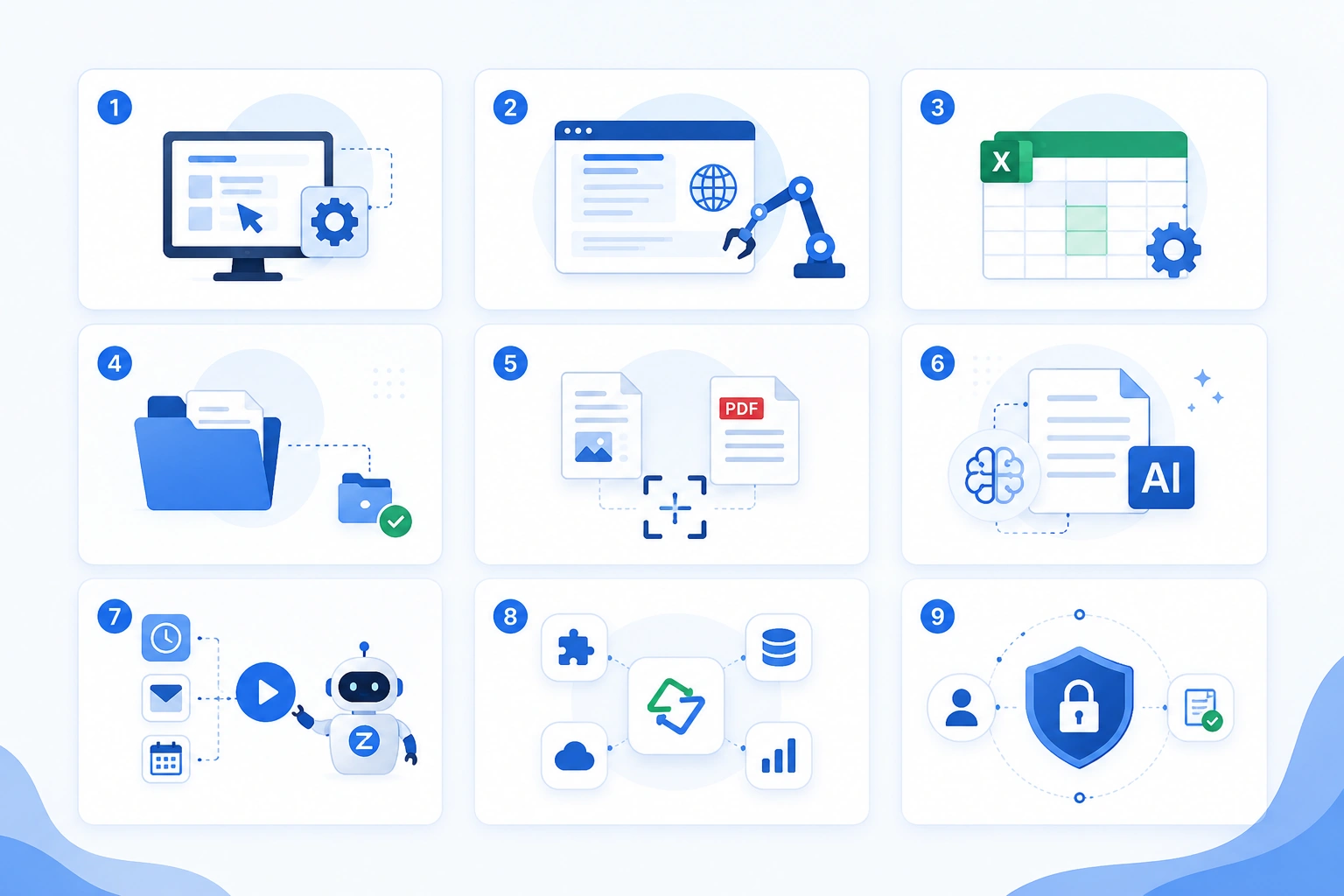
Zoho RPA covers several types of automation, which makes it useful for businesses with a mix of modern and older systems.
1. Windows Automation
Many businesses still depend on Windows applications, including desktop software and older business systems. Zoho RPA can automate actions inside Windows applications, such as opening applications, entering information, moving data between systems, and responding to application events. This is particularly useful when an older application does not offer a convenient API.
For example, a company may need to take information from its CRM and enter it into a desktop application used by its operations team. Instead of asking an employee to repeat this process throughout the day, an RPA bot can handle the repetitive steps.
2. Web Automation
A large amount of business work happens inside web browsers. Employees may need to log in to portals, complete forms, retrieve information, submit applications, or update records. Zoho RPA can automate these browser-based actions.
For example, a business may need to submit information from its accounting system to an external portal that does not provide a direct integration. An RPA bot can interact with the website and complete the required steps.
3. Excel Automation
Excel remains an important part of many business processes. Teams use spreadsheets for reporting, calculations, data preparation, reconciliation, and operational tracking. Zoho RPA can automate repetitive Excel-related work such as opening files, moving or updating data, preparing reports, and performing repeated spreadsheet operations. This can be useful when employees spend hours every week preparing the same reports.
4. Files and Folder Automation
Not every repetitive process happens inside a business application. Businesses also spend time managing files. This may include:
- Renaming files
- Moving documents between folders
- Copying files
- Organizing documents
- Uploading files
- Creating backups
- Processing files in batches
Zoho RPA can automate these routine file management activities and reduce the amount of manual handling involved.
5. OCR and PDF Automation
Documents are another common source of manual work. Invoices, forms, applications, statements, and other documents may arrive as PDFs or scanned files. Employees then have to read the documents and enter the information into another system.
OCR-based automation can help turn information from scanned documents into usable digital data. This can make document-heavy processes faster and reduce manual data entry.
6. AI-Based Document Processing
Some documents are not perfectly structured. The location and format of information can vary from one document to another. AI-based document processing can help identify and extract important information from PDFs and images, making it useful for processes where simply reading fixed fields is not enough.
For example, a business receiving different invoice formats from multiple vendors may use document processing to identify important invoice information before sending it into the next step of the workflow.
7. Different Ways to Trigger an Automation
A business does not always want a bot to run at the same time every day. Some processes need to start when a particular event occurs. Zoho RPA supports different types of triggers, including schedules, webhooks, desktop events, and user actions. This allows businesses to choose when an automation should begin based on the process.
8. Pre-Built Tasks and Integrations
Zoho RPA also provides pre-built tasks for 1,000+ cloud applications. This can reduce the amount of work required when building automations across commonly used applications.
Businesses can therefore combine application-based automation with UI-based automation where needed instead of treating every process as a completely separate project.
9. Security and Compliance
Automation often involves sensitive business information, so security needs to be considered from the beginning. Zoho states that its RPA platform follows several recognized security, privacy, and quality standards, including SOC 2 Type II and ISO standards covering areas such as information security and privacy. It also supports requirements related to frameworks such as GDPR and HIPAA.
Businesses should still assess their own security, access, data handling, and compliance requirements before deploying automation for sensitive processes.
What Business Processes Are Best for Zoho RPA?
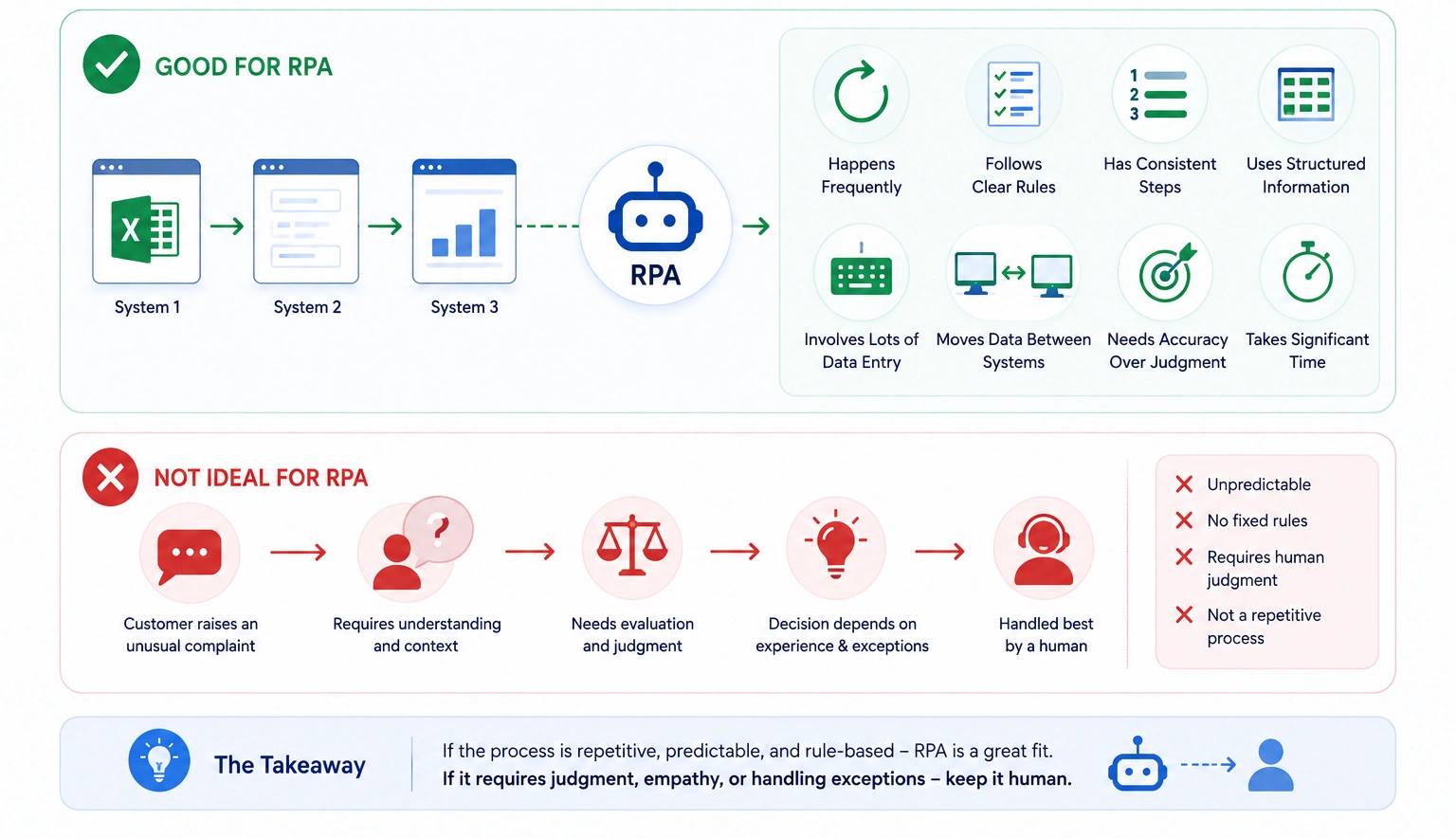
The biggest mistake businesses can make with RPA is trying to automate everything. RPA works best when a process is repetitive and predictable.
A process is usually a strong candidate when it:
- Happens frequently
- Follows clear rules
- Has a consistent sequence of steps
- Uses structured or semi-structured information
- Requires a lot of data entry
- Involves moving information between systems
- Needs accuracy more than human judgment
- Takes employees significant time to complete
For example, entering the same information into three systems every day is a strong RPA candidate. Deciding how to handle an unusual customer complaint is not.
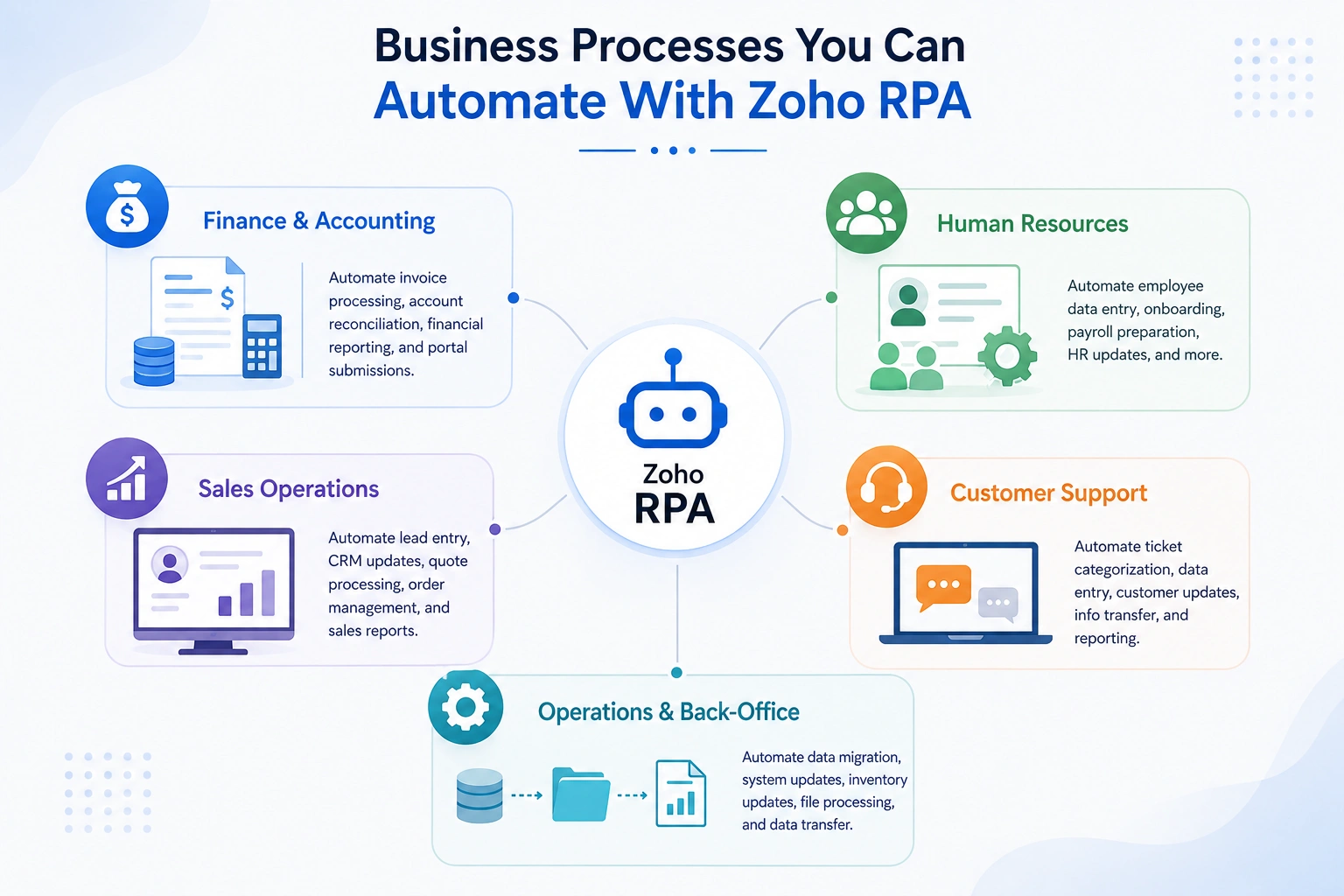
Business Processes You Can Automate With Zoho RPA
1. Finance and Accounting
Finance teams often deal with repetitive data and document-based processes. Possible use cases include:
Invoice processing: Extract information from invoices, validate required details, and move the information into the appropriate system.
Account reconciliation: Collect information from different sources, compare records, and identify mismatches for review.
Financial reporting: Collect information from different systems, prepare reports, and distribute them to the appropriate people.
External portal submissions: Move financial information from internal systems into external portals where no suitable integration is available.
2. Human Resources
HR processes often contain the same steps for every employee. For example, when a new employee joins, several systems may need to be updated. Instead of an HR employee entering the same information repeatedly, automation can handle the standard steps while the HR team focuses on tasks that require human interaction.
Zoho RPA can assist with tasks such as:
- Employee data entry
- Account creation
- Document distribution
- HR system updates
- Leave and attendance data processing
- Payroll data preparation
- Updating information across multiple systems
3. Sales Operations
This can reduce the time sales representatives spend on administrative work. Sales teams also deal with repetitive administrative work. Potential RPA use cases include:
- Lead data entry
- Updating CRM records
- Processing quote information
- Order processing
- Sales report preparation
- Moving information from external forms into CRM systems
4. Customer Support
Customer support teams often work across several systems. A support process may involve receiving a request, checking customer information, updating a ticket, moving information into another system, and preparing reports. RPA can assist with repetitive parts of these workflows, including:
- Ticket categorization
- Data entry
- Customer information updates
- Moving information between systems
- Support reporting
5. Operations and Back-Office Work
Operations teams are often the best candidates for RPA because their processes involve large amounts of repetitive data handling. These tasks may involve several systems, making them difficult to automate through a single application workflow. Examples include:
- Data migration
- System updates
- Vendor information management
- Inventory updates
- Order status updates
- File processing
- Data transfer between applications
Zoho RPA and Zoho One: How Do They Work Together?
Zoho One brings together applications for areas such as sales, finance, HR, marketing, and operations. Within the Zoho ecosystem, businesses can use workflows, integrations, APIs, and other automation capabilities to connect applications. But there is an important limitation to traditional application-based automation.
What happens when the system you need to connect does not have a suitable API?
This is where RPA becomes useful. Instead of connecting only at the application or API level, an RPA bot can interact with the user interface. It can click buttons, enter information, navigate screens, read information, and complete forms.
This means a business can potentially connect Zoho applications with external websites, desktop applications, legacy systems, and other tools that are difficult to integrate through conventional methods.
A Simple Example
Imagine a company processes invoices in its accounting system but has to submit certain information through an external government portal. The accounting system and portal may not have a direct integration.
A traditional API-based workflow may stop at this point. With RPA, the bot can take the required information, open the portal, enter the details, and complete the repetitive submission process. The human employee does not need to repeat those steps for every invoice.
Zoho RPA vs API Integration: Which One Should You Use?
RPA is not meant to replace every other type of automation. In fact, businesses should first look at the simplest and most reliable way to connect their systems. A basic comparison looks like this:
If two systems have reliable APIs and the process is straightforward, an API integration may be the better option. If employees have to repeatedly interact with a website, desktop application, spreadsheet, or legacy system, RPA may be more suitable. In some cases, the best solution is a combination of all three.
When Should You Not Use RPA?
RPA is powerful, but it is not the right answer for every process. Automation should make a good process better. Automating a badly designed process can simply make the same problems happen faster. You may want to reconsider RPA when:
- The process changes frequently
- The steps are not clearly defined
- The work requires significant human judgment
- A reliable API integration already exists
- The application interface changes regularly
- The process itself needs to be redesigned before automation
How to Find the Right RPA Opportunities
Before building a bot, look at the processes your employees repeat every day or every week. You can connect with a Zoho Consulting Partner or ask these questions:
How often does the process happen? A task performed hundreds of times is usually more attractive than something performed once a month.
How much time does it take? Calculate the actual employee time spent on the process.
How predictable are the steps? The clearer the rules, the easier it is to automate.
How many systems are involved? Processes that require constant switching between applications can be good RPA candidates.
Are there APIs available? If a clean API integration can solve the problem, compare that option with RPA before making a decision.
What happens when something goes wrong? Identify exceptions before automation is deployed. Not every situation should be handled automatically.
Benefits of Using Zoho RPA
When the right processes are selected, RPA can provide several practical benefits.
1. Less Manual Work: Employees spend less time repeating clicks, typing information, and moving data between applications.
2. Fewer Data Entry Errors: Automated steps can reduce mistakes caused by repetitive manual entry.
3. Faster Processing: A bot can perform repetitive tasks without waiting for an employee to become available.
4. Better Use of Employee Time: Employees can spend more time on customer interactions, analysis, decision-making, and other work that requires human judgment.
5. Automation Across Different Systems: RPA can help connect processes across cloud applications, desktop software, websites, spreadsheets, and documents.
6. More Consistent Processes: When the same rules are followed every time, businesses can achieve more consistent execution of routine tasks.
A Practical Way to Start With Zoho RPA
You do not need to automate an entire department on day one. A better approach is to start with one process. Choose a repetitive task that:
- Takes considerable manual time
- Has clear steps
- Has relatively few exceptions
- Creates a noticeable operational burden
- Can be measured before and after automation
Then document the current process. Once the process is understood, determine whether RPA, an API integration, workflow automation, or a combination of approaches is the best solution. Build and test the automation before putting it into regular use. Finally, measure the results. Look at factors such as time saved, processing speed, error reduction, and employee effort. This gives you a clear picture of whether the automation is actually creating value.
Who Are CRM Masters?
CRM Masters is a Zoho Premium Partner helping businesses implement, integrate, customize, and optimize Zoho solutions around their business processes.
With Zoho RPA, we can help you:
- Identify repetitive processes that are suitable for automation
- Design and implement practical RPA workflows
- Connect RPA with Zoho applications and other business systems
- Automate repetitive web, desktop, document, and data-based tasks
- Improve existing automations as your business processes evolve
The goal is to make automation useful for your business without unnecessarily complicating your processes.
FAQ
Q1. What is Zoho RPA?
Ans. Zoho RPA is a robotic process automation platform that helps businesses automate repetitive tasks across web applications, desktop systems, spreadsheets, files, documents, and other business processes.
Q2. Can Zoho RPA automate applications without APIs?
Ans. Yes. One of the main advantages of RPA is its ability to automate processes through the user interface. This can make it useful for websites, desktop applications, and legacy systems where a suitable API is not available.
Q3. Does Zoho RPA work with Excel?
Ans. Yes. Zoho RPA includes Excel automation capabilities for repetitive spreadsheet-related activities such as data handling, reporting, and other routine operations.
Q4. Can Zoho RPA process PDFs and scanned documents?
Ans. Yes. Zoho RPA supports OCR and PDF automation, and its AI-based document processing capabilities can help extract information from PDFs and images.
Q5. Is Zoho RPA part of Zoho One?
Ans. Zoho RPA can extend automation across the Zoho ecosystem and external applications. It can be particularly useful when a Zoho One workflow needs to interact with systems that are not directly connected through standard integrations.
Q6. What type of processes are best for RPA?
Ans. Processes that are repetitive, rule-based, predictable, high-volume, and involve structured or semi-structured data are generally good candidates.
Q7. Is RPA better than API integration?
Ans. Not necessarily. They solve different problems. APIs are generally preferable when reliable system-to-system integration is available. RPA becomes useful when the process depends on user interfaces, legacy applications, desktop software, or systems without suitable APIs.