



On Premise vs Cloud CRM: Why Businesses Are Switching to Cloud CRM in 2026
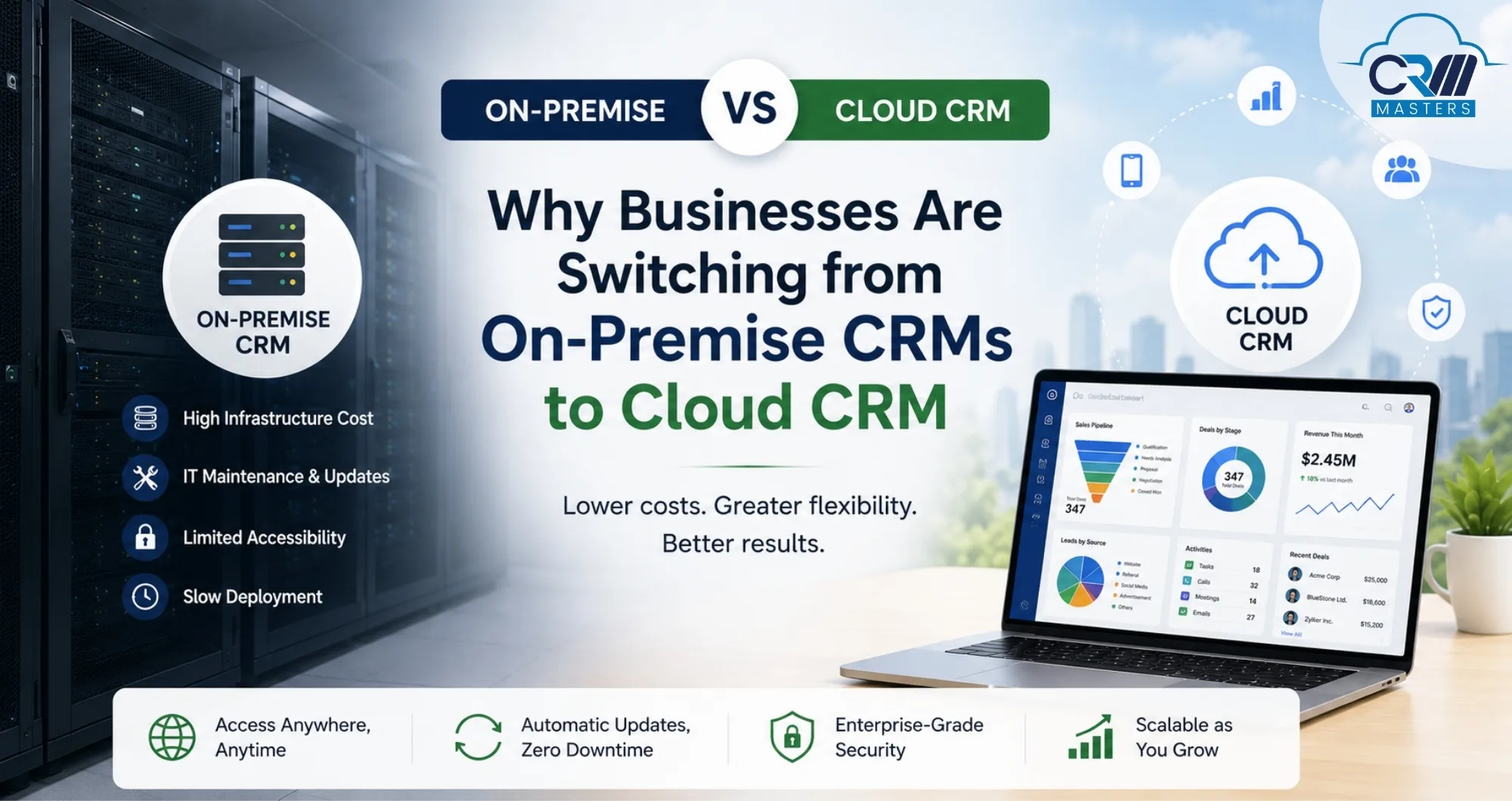
In the ongoing On-Premise vs Cloud debate, more businesses are now moving away from traditional on-premise CRM systems and choosing flexible cloud CRM platforms instead. In this blog, you’ll learn the on-premises meaning, what on-premises infrastructure is, how an on-premises server works, and why businesses are switching from on-premises CRM to cloud-based CRM solutions faster than ever.
There was a time when owning your own servers felt like a mark of serious business. You had full control, your data stayed on-site, and your IT team managed everything. But the landscape has shifted dramatically, and the numbers back this up. According to Flexera’s 2024 State of the Cloud Report, 94% of enterprises now use cloud services, and migration from traditional on-premise infrastructure is accelerating across every industry.
So what’s driving this change? And is cloud CRM genuinely better, or is everyone just going with the trend? Let’s break it all down.
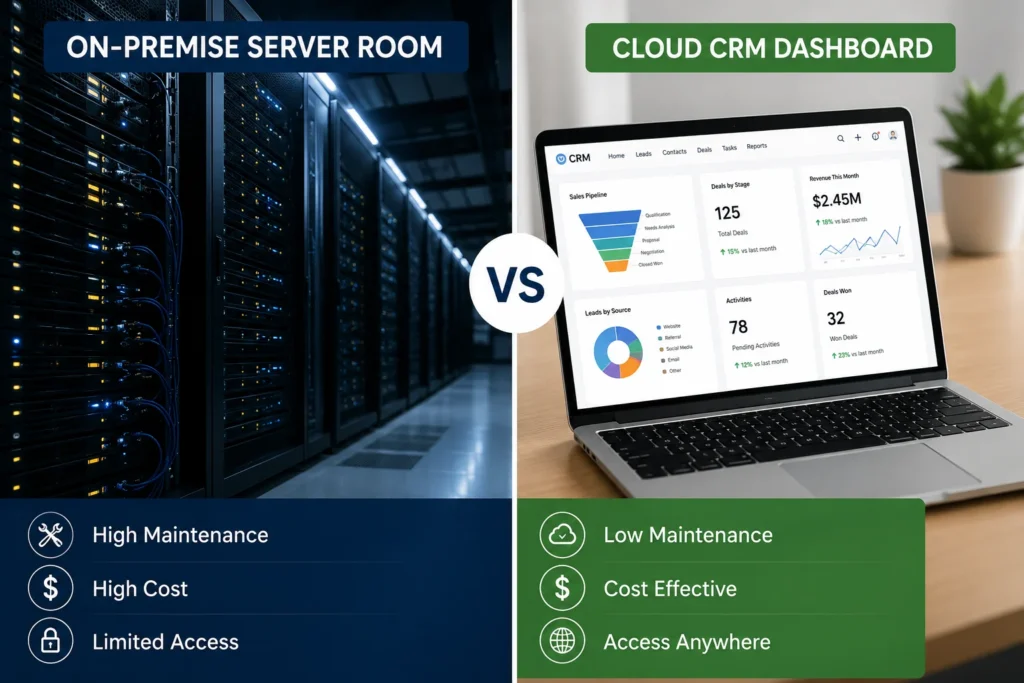
What Is On-Premise CRM? Understanding the On-Premise vs Cloud Basics
Before we dive into the On-Premise vs Cloud comparison, let’s get clear on the on-premise meaning, because it’s a term that gets used loosely. On-premise (also written “on-prem”) refers to software and IT infrastructure that is physically installed and operated within a business’s own facilities. Rather than accessing software via the internet through a third-party provider, on-premise solutions run on an on-premise server owned, housed, and maintained by the business itself, or in a private data centre it controls.
In the context of CRM (Customer Relationship Management), an on-premise CRM means:
- Your customer data lives on hardware inside your office or data centre
- Your IT team handles all updates, security patches, and performance tuning
- Access is typically limited to your internal network (with VPN for remote users)
- You pay large upfront licence fees plus ongoing maintenance costs
This used to be the standard way businesses ran their CRM. Tools like Microsoft Dynamics (on-prem), SugarCRM, and older versions of Salesforce all worked this way. It made sense at the time, but running everything yourself comes with a lot of hidden hassle and cost that many businesses didn’t see coming.
New to CRM? Read our Beginner’s Guide to Get Started with Zoho CRM
On-Premise Data Gateway: What It Is and Where It Fits in On-Premise vs Cloud
When businesses start moving to the cloud, they sometimes need a way to connect their old on-premise systems with new cloud tools. That’s where an on-premise data gateway comes in.
In simple terms, an on-premise data gateway is like a secure connector or a bridge. It lets your cloud software talk to data that’s still sitting on your old on-premise server, without making that data open to the whole internet. Think of it as a controlled channel between two worlds.
When Do You Need an On-Premise Data Gateway in the On-Premise vs Cloud Shift?
For most small and medium-sized businesses, the on-premise data gateway is just a short-term helper during the transition. Once you’re fully on a cloud CRM like Zoho CRM, you won’t need it anymore. Zoho connects directly with hundreds of tools right out of the box.
- When you’re slowly moving to the cloud and still have some old systems running on-premise
- When your industry has rules about where certain data must be stored (like banking or healthcare)
- When you have older software, like an accounting or ERP system, that isn’t ready to move to the cloud yet, but still needs to work with your new cloud CRM
- When you need a short-term fix while your full migration is being planned
For most small and medium-sized businesses, the on-premise data gateway is just a short-term helper during the transition. Once you’re fully on a cloud CRM like Zoho CRM, you won’t need it anymore. Zoho connects directly with hundreds of tools right out of the box.
Ready to make the move? Explore our Zoho Migration Services for a smooth, guided transition.
What is Cloud-Based CRM?
Before comparing on premise vs cloud in detail, it’s important to understand what cloud CRM actually means.
A cloud CRM is a customer relationship management system that is hosted online by the software provider instead of being installed on your own on-premise server. Your team accesses it through a web browser or mobile app, and the provider takes care of the hosting, updates, security, backups, and overall system maintenance.
In simple terms, instead of managing the software yourself, you use it as an online service.
With a cloud CRM:
- Your customer data is stored securely in the provider’s cloud infrastructure
- Your team can access the CRM from anywhere with an internet connection
- Updates and new features are added automatically
- You don’t need to buy or maintain expensive servers
- Scaling your system is much easier as your business grows
Popular cloud CRM platforms include Zoho CRM, Salesforce CRM, and HubSpot CRM.
Cloud CRM has become the preferred choice for modern businesses because it gives teams flexibility, lower IT costs, easier collaboration, and access to newer technologies like AI and automation without the complexity of managing everything in-house.
On-Premise vs Cloud CRM: A Direct Comparison
The on-premises vs. cloud debate comes down to three core questions: where does your data live, who manages the infrastructure, and how does your team access the system?
When businesses evaluate On-Premise vs Cloud CRM solutions, these are usually the key differences they compare:
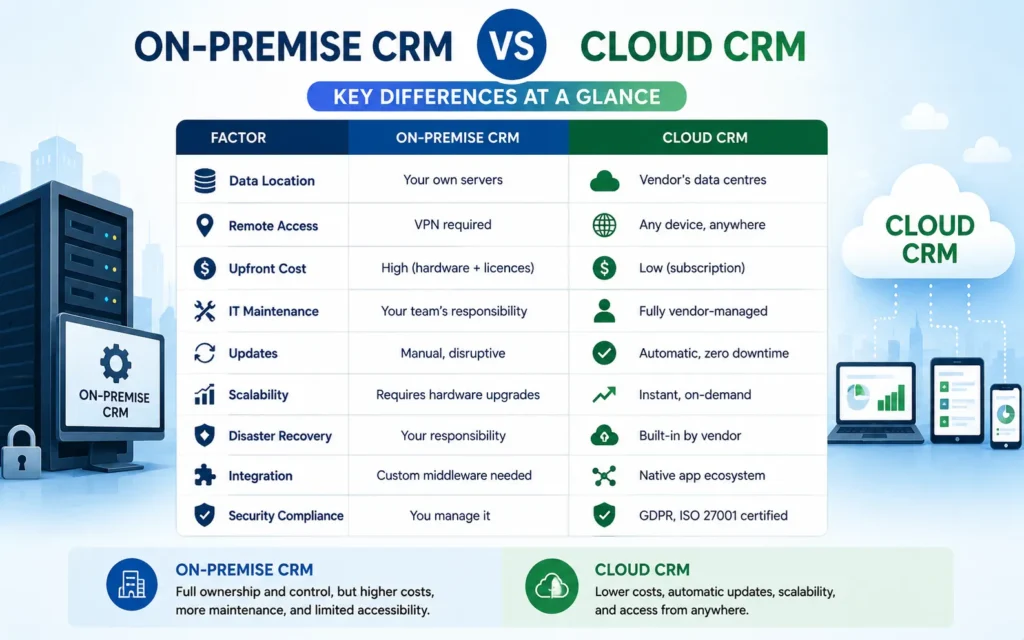
The table says it all. With on-premise, you’re fully in control, but that also means every problem, every update, and every cost lands on your plate. This is one of the biggest reasons why the On-Premise vs Cloud discussion has shifted so heavily towards cloud-based systems in recent years. Their entire job is to keep the system running well, so you can focus on your business.
Here are all the points explained well:
1. Data Location
With an on-premise CRM, all your customer data sits on physical servers inside your own office or a data centre that your business owns and controls. Nothing leaves your building unless you choose to move it. With a cloud CRM, your data is stored on the software provider’s secure servers, usually spread across multiple locations around the world. You still own your data, but the provider looks after the hardware it lives on. For businesses that need full physical control over where their data sits, on-premises feels more reassuring. But for most businesses, a cloud provider’s infrastructure is far more secure and reliable than what they could manage themselves.
2. Remote Access
With an on-premise CRM, getting into the system from outside the office is not simple. Your team usually needs a VPN, which is a secure connection tunnel into your company’s internal network, to log in remotely. Setting this up takes technical effort, and it can be slow or unreliable for staff who work from home or travel regularly. With a cloud CRM, your team can log in from any phone, laptop, or tablet, from anywhere in the world, as long as they have an internet connection. No VPN, no complicated setup, no restrictions on which device they use.
3. Upfront Cost
On-premise CRM comes with a high cost before you even get started. You need to buy physical servers, pay for software licences, cover installation costs, and often bring in outside help to set everything up. This can run into tens of thousands before a single person uses the system. Cloud CRM works very differently, as there is no large upfront investment. You simply pay a monthly or annual subscription based on how many users you have and which features you need. This makes cloud CRM far more accessible, especially for small and growing businesses that cannot afford to tie up large amounts of money in IT infrastructure. Contact us to know the exact cost for cloud CRM for your business.
4. IT Maintenance
With an on-premise CRM, your internal IT team is responsible for everything that keeps the system running. That includes maintaining the servers, applying security patches, fixing bugs, managing backups, and dealing with any problems that come up, including ones that happen at night or on weekends. If you do not have a strong IT team, this becomes a heavy and expensive burden. With a cloud CRM, the software provider handles all of this for you. Their engineers monitor the system around the clock and deal with technical issues before they affect your team. You do not need a large IT department just to keep your CRM working properly.
5. Updates
With an on-premise CRM, updates are a project in themselves. Your IT team has to plan the update, test it carefully, schedule a period of downtime, and then roll it out in a controlled way so it does not disrupt the business. This takes time and money, which means many teams end up working on outdated software for longer than they should. With a cloud CRM, updates happen automatically in the background. The provider rolls out new features and security improvements on a regular basis without any disruption to your team. You simply log in one day and find improvements already in place, with no effort required from your side.
6. Scalability
When your business grows, and your on-premise system needs more capacity, you have to physically purchase additional servers, install them, and integrate them with your existing setup. This takes time, costs money, and requires planning well ahead of when you actually need it. Getting it wrong means either overspending on hardware you do not yet need or scrambling to keep up with growth. With a cloud CRM, scaling is almost instant. Need to add more users or increase storage? A few clicks and it is done. You only pay for what you use, and you can adjust your plan up or down as your business changes, without any hardware headaches.
7. Disaster Recovery
With an on-premise CRM, if something goes seriously wrong, such as a fire, flood, power failure, or cyberattack, recovering your data is entirely your responsibility. This requires having a solid backup plan already in place, which many businesses do not fully prepare for until it is too late. Rebuilding after data loss can take days or even weeks, and the cost can be enormous. With a cloud CRM, disaster recovery is built into the service. Providers automatically back up your data across multiple secure locations, so even if something fails in one place, your data is safe, and the system keeps running. This level of resilience would be very expensive to build and maintain on your own on-premise infrastructure.
8. Integration
With an on-premise CRM, connecting to other business tools like your accounting software, email platform, or marketing tools is rarely straightforward. It usually requires custom development work from your IT team or an outside developer, which takes time and adds cost every time you want to add a new connection. With a cloud CRM, most of the popular integrations are already built in and ready to use out of the box. Platforms like Zoho CRM connect directly with hundreds of tools, including Gmail, WhatsApp, Xero, Shopify, and Microsoft 365, and most of these can be set up in minutes without any technical help needed.
9. Security Compliance
With an on-premise CRM, your business is fully responsible for its own security. That means staying on top of the latest threats, applying patches quickly, managing who can access what, and making sure you meet any legal or industry compliance requirements. For most small and mid-sized businesses, this is a heavy responsibility that requires constant attention and investment. With a cloud CRM, the provider takes on that responsibility. Reputable platforms like Zoho CRM are certified against international standards, including GDPR, ISO 27001, HIPAA, and SOC 2. They have dedicated security teams working around the clock to protect your data, offering a level of protection that most businesses could not realistically afford to build on their own.
On-Premise vs Cloud CRM: 7 Reasons Businesses Are Choosing Cloud
So what’s pushing businesses away from on-premise and towards cloud CRM? Here are the seven main reasons we hear again and again from the businesses we work with.
In the On-Premise vs Cloud debate, these are the biggest reasons modern businesses are choosing cloud CRM platforms.
1. Your Team Needs to Work from Anywhere
After the pandemic, remote and hybrid work became the new normal. But in the On-Premise vs Cloud comparison, for people working from home, travelling, or based in different cities. Cloud CRM works on any phone, laptop, or tablet, from anywhere with an internet connection. No VPN, no office required.
2. You Can Get Started Much Faster
Setting up an on-premise CRM can take months; you need to buy hardware, set up the network, install the software, and move all your data. Cloud CRM is much faster to get going. Most businesses are up and running within a few days to a couple of weeks. That
means less waiting and faster results.
3. Updates Happen Automatically
With on-premise CRM, keeping up with software updates is a project in itself. It takes time, costs money, and often disrupts your team. With cloud CRM, updates happen in the background automatically. You always have the latest version with the newest features, and you don’t have to do anything.
4. Growing Your Business Doesn’t Mean Buying New Servers
When your team grows, an on-premise server often can’t keep up without buying more hardware, which takes time and money. With cloud CRM, you simply add more users or storage with a few clicks. It grows as fast as your business does, without any big upfront spending.
5. Strong Security Without Needing a Big IT Team
Security is a big concern for any business. Cloud CRM providers like Zoho invest heavily in protecting your data with things like data encryption, two-factor login, and compliance with standards like GDPR, ISO 27001, and HIPAA. Most small or mid-sized businesses can’t match that level of security on their own on-premise server.
6. It Connects Easily With Your Other Business Tools
Businesses today use lots of tools, such as email, accounting software, WhatsApp, marketing platforms, and more. Cloud CRMs like Zoho, connect directly with hundreds of these tools without needing any complicated technical setup. On-premise systems often need expensive custom work just to do the same basic connections.
7. You Get AI and Smart Features Built Right In
Cloud CRMs are adding smart AI features all the time, like automatic lead scoring, sales forecasting, and workflow automation. On-premise users usually have to wait years for a new version to get these features. With cloud CRM, new features roll out regularly, and you get them straight away.
Also Read: Top 10 Cloud-Based CRM Software of 2025
On-Premise vs Cloud CRM: Why Zoho CRM Is the Right Choice
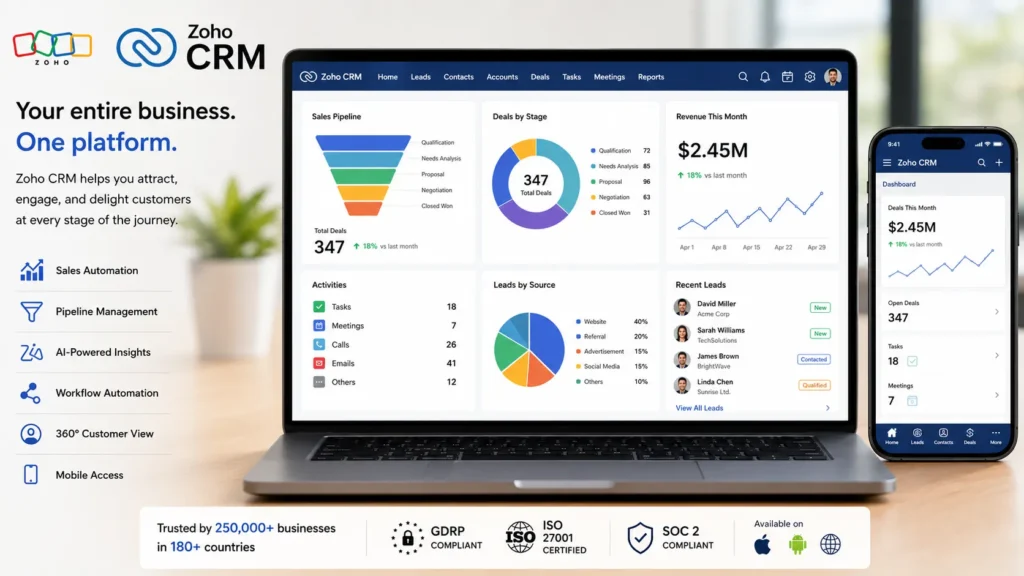
As a Zoho Premium Partner, we have helped businesses in retail, real estate, manufacturing, and many other industries move from on-premise to cloud CRM with our Zoho Consulting Services. And again and again, Zoho CRM has proven to be the right choice. Here’s why businesses love it.
What Makes Zoho CRM Stand Out
- Nothing to install or maintain: Zoho looks after all the technical side, so you don’t need to worry about servers or IT issues
- Use it from anywhere: Zoho CRM works on your phone, tablet, or laptop, so your team can stay connected whether they’re in the office or on the go
- Built-in AI assistant (Zia): Zia helps your sales team with things like scoring leads, predicting deals, and suggesting next steps, all automatically
- You can set it up your way: Zoho lets you customise fields, layouts, and workflows to match how your business actually works
- Works with other Zoho tools: It connects smoothly with Zoho Books, Zoho Desk, Zoho Campaigns, and more, so everything in your business talks to each other
- Connects with tools you already use: Gmail, Microsoft 365, WhatsApp, Shopify, Xero, and 500+ other apps work directly with Zoho CRM
- Safe and compliant: Zoho meets global data protection standards, including GDPR, ISO 27001, HIPAA, and SOC 2
- Clear, honest pricing: No surprise bills, no hardware costs, no expensive upgrade projects
Also Read: Zoho CRM with WhatsApp Integration
What Businesses Actually See After Switching to Zoho CRM
Here’s what businesses typically experience after moving from on-premise to Zoho CRM:
- 40 to 60% drop in CRM-related IT costs in the first year
- 30% boost in sales team productivity thanks to mobile access and automation
- New staff get up to speed much faster because Zoho is easy to learn
- Better data quality because Zoho automatically captures and cleans up lead information
Not sure which edition to pick? Zoho CRM vs Zoho CRM Plus vs Zoho One to find out the right fit for your business.
On-Premise vs Cloud: Is On-Premise CRM Still the Right Choice?
To be fair, on-premise isn’t completely off the table for every type of business. There are a few situations where it might still make sense:
- Government or defence organisations that have strict rules about where data can be stored
- Certain banks or financial institutions have very specific regulations about data location
- Businesses in areas with very poor or unreliable internet connections
- Companies with very old internal software that can’t yet be connected to cloud systems
That said, even in these industries, most organisations are now looking at private cloud or hybrid options, which give them the flexibility of cloud while still keeping control over their data. Zoho CRM, for example, offers data residency options so your data can stay in a specific region if your rules require it.
For the vast majority of businesses, especially small and medium-sized businesses, growing companies, and teams that work remotely, moving to cloud CRM simply makes more sense today. Contact us and book your consultant today to know more about it.
FAQ
Q1. Will I lose any data when switching to cloud CRM?
Ans. No. When the migration is done properly, your data is carefully transferred and checked at every step. We always run both systems side by side for a period before switching over fully, so nothing gets lost.
Q2. Can Zoho CRM fully replace my current on-premise CRM?
Ans. In most cases, yes. Zoho CRM can be set up to work the way your business works, and it can import data from almost any existing system. It’s a full replacement for on-premise CRMs like Microsoft Dynamics, SugarCRM, and Sage CRM.
Q3. What Zoho CRM services does CRM Masters offer?
Ans. We offer end-to-end Zoho CRM services from initial consulting and CRM setup to full data migration, custom configuration, integrations with your existing tools, automation, and ongoing support. As a Zoho Premium Partner, we handle everything so your team can focus on selling, not setting up software.
Q4. Do you provide Zoho CRM training for our team?
Ans. Yes. Every implementation we do includes user training tailored to your team’s role, whether that’s your sales reps, managers, or admins. We make sure everyone knows how to use the system confidently before we hand it over.