What Is Zoho One? A Detailed Guide to Pricing, Features, and How It Works
As businesses grow, their software setup often grows with them. Sales uses one system, finance another, marketing adds its own tools, and customer support maintains separate records. Each application may work well on its own, but keeping information consistent across all of them can become a problem.
This is where Zoho One comes in. It brings together applications for sales, finance, marketing, customer service, HR, operations, analytics, collaboration, and other business functions within a broader ecosystem. It also provides tools for automation, integrations, administration, and customization.
The value of Zoho One is not simply having many applications under one platform. It is the ability to connect business processes and information across departments, reducing unnecessary manual work and creating a more structured way to manage the organization.
In this blog, we will look at what Zoho One is, how it works, what it includes, its pricing, implementation considerations, and how it compares with other Zoho products.
Key Takeaways
Zoho One: a single integrated platform for multiple business functions: Zoho One brings together software for sales, finance, marketing, customer service, HR, operations, analytics, collaboration, and more into one ecosystem. The key value is connecting processes across departments, not just listing many apps.
Operating system for business: connected processes over standalone apps: Zoho One is designed to enable information and actions to flow between departments, reducing manual data movement and providing centralized administration for users and access.
Range of included functions and evolving app set: Zoho One covers sales, marketing, finance, customer service, HR, project/operations management, analytics, automation, and custom app development, with the exact apps changing as Zoho updates its platform.
Choosing Zoho One vs individual Zoho products: Zoho One offers a broader, cross-department platform, while Zoho CRM or CRM Plus target specific customer-facing needs; the choice depends on the desired scope of integration across the organization.
Implementation, cost, and common pitfalls: Implementation involves process analysis, data migration, integrations, and training; pricing varies by edition and licensing model, with additional costs for implementation and optimization. Common mistakes include starting with apps before understanding processes and automating unstable workflows.
What Is Zoho One?
Zoho One is an integrated business platform from Zoho that brings software for various business functions into a single ecosystem.
A business can use it to build systems for customer management, finance, marketing, employee management, operations, collaboration, analytics, and other processes. The important part is not simply that many applications are available, but that these applications can be connected around business processes.
For example, a company may receive a new enquiry, qualify it, convert it into an opportunity, close a sale, create an invoice, receive payment, and continue supporting the customer after the purchase. Those steps involve different teams and different types of information. With disconnected software, employees may need to manually transfer information between systems.
With a connected Zoho One setup, those processes can be designed to work together. This is why Zoho describes Zoho One as an operating system for business. The idea is not to replace every business process with one application. It is to provide a broader environment in which different business systems can operate together.
How Does Zoho One Work?
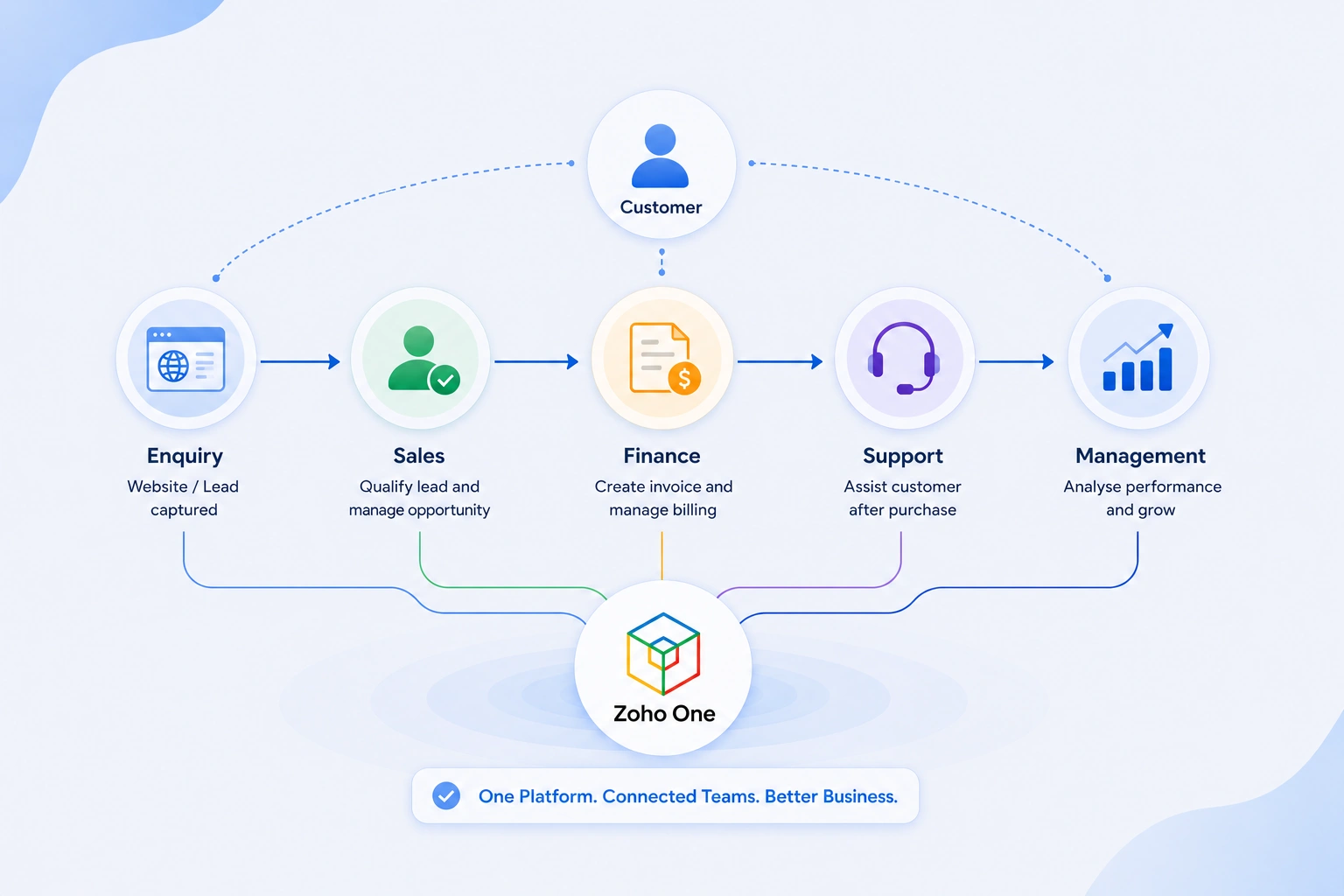
The best way to understand Zoho One is through a business process rather than an application list. Consider a company that receives enquiries through its website.
A potential customer enters the sales process. The sales team qualifies the enquiry and works on the opportunity. Once the customer places an order, finance needs the relevant information for billing. After the purchase, the customer may contact support.
From the customer’s perspective, this is one relationship.
From inside the company, several teams are involved.
A disconnected technology setup can turn this into several separate processes.
A connected setup can allow information and actions to move between them.
For example:
Marketing generates interest → Sales manages the opportunity → Finance handles billing → Support manages the customer relationship after purchase → Management analyses the overall performance
The value is not in making every department use the same application.
The value is in reducing unnecessary separation between the systems they use.
What Does Zoho One Include?
Zoho One covers a broad range of business functions.
These include areas such as:
- Sales and customer management
- Marketing
- Finance
- Customer service
- Human resources
- Project and operations management
- Collaboration
- Business analytics
- Communication
- Automation
- Custom application development
The exact applications available within Zoho One can change as Zoho adds products and updates its platform. For that reason, an article about Zoho One should not be reduced to a fixed application count. If you want to explore the individual products in detail, see our Zoho One applications guide.
How Is Zoho One Different From Buying Individual Zoho Applications?
Zoho applications can be used individually.
A business may choose Zoho CRM without using Zoho One. Another company may use Zoho Books for accounting without deploying the wider platform.
Zoho One takes a broader approach.
Instead of choosing software independently for every department, the business can build a wider technology environment around the Zoho ecosystem. This can be useful when several parts of the business need to communicate with each other.
For example, a company using only a CRM may solve its sales management problem. A company using CRM alongside finance, support, marketing, analytics, and automation can address a much wider set of processes. The choice therefore depends on the scope of the business requirement. If you need one application, an individual Zoho product may be enough.
If you are trying to connect several business functions, Zoho One may be worth considering.
Also Read: Top Zoho Integrations Every Business Should Use in 2026
What Makes the Connected Approach Useful?
The benefit of a connected platform becomes clearer when you look at the work employees normally do between systems. Consider a salesperson who closes a deal.
In a disconnected environment, someone may need to:
1. Copy customer information into the finance system
2. Create a separate customer record
3. Share order details with another department
4. Update a spreadsheet
5. Notify the support team
6. Prepare a separate management report
Not every business follows this exact process, but the pattern is common. The more systems involved, the more opportunities there are for information to become inconsistent. A connected environment can reduce some of this manual movement through integrations and automation.
Zoho One also provides centralized administration for users and application access, which can make managing a wider software environment more structured.
Zoho One vs Zoho CRM vs Zoho CRM Plus
Zoho One, Zoho CRM, and Zoho CRM Plus serve different business requirements, so the right choice depends on how much of the organization you want to manage through the platform.
Zoho CRM is focused on customer relationship management, including leads, contacts, accounts, opportunities, sales activities, and related sales processes. If your main requirement is to organize and improve your sales and customer management, Zoho CRM may be sufficient.
Zoho CRM Plus goes beyond CRM by bringing together tools for sales, marketing, and customer service. It is more suitable for businesses that want to manage the broader customer experience while keeping their focus on customer-facing teams.
Zoho One has a wider scope. It extends beyond sales and customer experience to cover areas such as finance, HR, operations, collaboration, analytics, and other business functions. CRM can be part of a Zoho One setup, but the platform is intended to support the organization as a whole.
In simple terms, Zoho CRM is primarily for managing customer relationships, Zoho CRM Plus is built around the wider customer experience, and Zoho One is designed as a broader business platform. The choice should therefore depend on whether you need to solve a specific sales requirement, connect customer-facing functions, or bring multiple departments into a more connected technology environment.
Check out the differences between Zoho CRM, Zoho CRM Plus, and Zoho One
When Should You Consider Zoho One?
Zoho One may be worth considering when your business is using multiple systems but still relies on manual work to keep everything connected. As the business grows, these gaps can become harder to manage. The real question is not how large your business is. It is whether your current software setup is making everyday work more complicated than it needs to be.
You may want to consider Zoho One if:
- Different teams use separate tools and sharing information is difficult.
- Employees enter the same data more than once across different systems.
- Business processes involve multiple departments, but each team works separately.
- Spreadsheets are filling gaps in your existing software.
- You keep adding new tools as the business grows, creating more integrations to manage.
- Reporting takes too much effort because information is spread across different systems.
- Repetitive tasks are still handled manually even though they could be automated.
What Does Zoho One Implementation Involve?
Implementation is where the difference between buying software and building a usable business system becomes clear. A business first needs to understand how its current processes work.
That includes questions such as:
- Where does customer data enter the business?
- Who works with it next?
- Which information needs to move between departments?
- Where are employees still using spreadsheets?
- Which tasks are repeated every day?
- Which existing systems need to remain connected?
- What should be automated and what should remain under human control?
The answers determine how the Zoho One environment should be designed. Implementation can involve:
- Process analysis
- Application selection
- Configuration
- Data migration
- Integrations
- Automation
- User roles and permissions
- Testing
- Training
- Rollout
- Post-implementation optimization
This is why two companies using Zoho One can have very different setups. They may use many of the same products, but their workflows, data structures, approval processes, integrations, and reporting requirements can be completely different.
How Much Does Zoho One Cost?
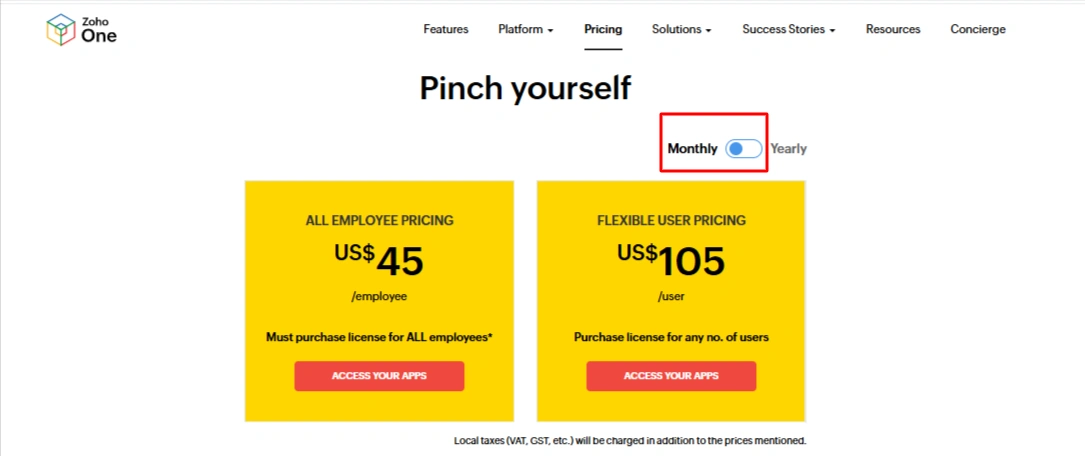
Zoho One pricing depends on the edition and licensing model you choose. Zoho currently offers Essentials and Standard editions, with Standard available through two licensing options: All Employee and Flexible User
Zoho One Monthly Pricing
Source: Zoho
Zoho One Yearly Pricing
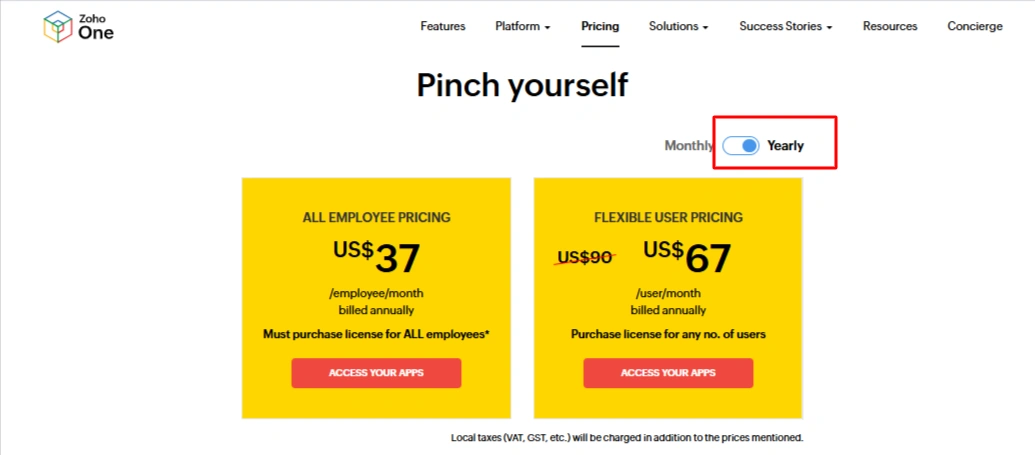
Source: Zoho
Prices shown are based on annual billing and can vary by region, taxes, and currency. Check Zoho One’s pricing page for the current price applicable to your location.
The All Employee model requires the business to purchase Zoho One licenses for all employees on its payroll. The Flexible User model allows a business to purchase licenses for the users who need Zoho One, which can be more suitable when only certain employees require access.
The subscription is only one part of the overall investment. Businesses with complex requirements may also need to budget for implementation, data migration, customization, integrations, automation, training, and ongoing optimization. These costs depend on the existing systems and the scope of the project rather than being part of the Zoho One subscription itself.
Also read: Factors Affecting Zoho One Implementation Cost: A Complete 2026 Breakdown
What Should You Consider Before Choosing Zoho One?
Before choosing the platform, look at the business rather than the application catalogue. Identify the processes where better systems will have the clearest business impact. Start with five questions:
1. How many systems are we currently using?
List the software used by sales, finance, marketing, support, HR, operations, and management.
2. Where does information get entered more than once?
Repeated data entry is often a sign that systems are not connected properly.
3. Which processes involve several departments?
These are usually the areas where integration can have the greatest impact.
4. Which processes are still dependent on spreadsheets?
Not every spreadsheet is a problem. But when spreadsheets become essential to running a core business process, it is worth understanding why.
5. What needs to change first?
A successful implementation does not have to solve every problem on day one.
Common Mistakes to Avoid With Zoho One
1. Choosing Applications Before Understanding the Process
It is easy to start with the application list and try to fit business requirements around it. A better approach is to map the existing process first, identify the actual gaps, and then decide which applications and features are needed.
2. Rebuilding Inefficient Processes
Moving to a new platform is a chance to improve the way work is done. If an existing process has unnecessary approvals, duplicate entries, or manual steps, simply recreating it in Zoho One will carry the same problems into the new system.
3. Moving Poor Quality Data
Migration is not just an export and import exercise. Existing data may contain duplicates, outdated records, inconsistent fields, or information that is no longer required. Cleaning and mapping the data before migration can prevent these issues from affecting the new system.
4. Automating Before Testing the Workflow
Automation works best when the underlying process is already clear and stable. Automating a process too early can make mistakes happen faster and make them harder to identify.
5. Treating Implementation as the Finish Line
A business does not stay the same after implementation. Processes, teams, data requirements, and software capabilities change over time. Reviewing and optimizing the Zoho One setup periodically helps keep it aligned with those changes.
How Can CRM Masters Infotech Help?
CRM Masters Infotech is a Zoho consulting and implementation company that helps businesses plan, implement, customize, integrate, migrate, and optimize AI-powered Zoho solutions based on their business processes since 2016.
Why do businesses choose us as their Zoho One Implementation Partner?
Zoho Premium Partner: We are a Zoho Premium Partner with experience delivering complex AI-powered Zoho solutions.
2,400+ Zoho Projects: We have successfully completed 2,400+ Zoho projects across implementation, customization, migration, integration, and automation.
Global Business Experience: We have worked with businesses across the world and understand different operational and business requirements.
15+ Industries: Our experience covers businesses across 15+ industries, with different workflows, processes, and technology needs.
Certified Zoho Experts: Our team includes certified professionals with hands-on experience across the Zoho ecosystem.
Business First Approach: We understand your processes and requirements first, then design the Zoho solution around your business.
Find CRM Masters on Zoho Partner Directory
CRM Masters is listed on Zoho’s official partner directory as a verified Zoho Premium Partner. You can view our profile, read verified client reviews, and see our certifications directly on Zoho’s platform.
FAQ
Q1. What is Zoho One used for?
Ans. Zoho One connects sales, marketing, finance, HR, support, operations, analytics, and other business functions within one ecosystem, helping businesses centralize information and streamline processes.
Q2. Is Zoho One a CRM?
Ans. No. Zoho One is a broader business platform that includes Zoho CRM alongside applications for finance, marketing, HR, operations, collaboration, analytics, and other business functions.
Q3. Does Zoho One include Zoho CRM?
Ans. Yes. Zoho CRM is included in Zoho One, allowing businesses to connect customer management with finance, marketing, support, operations, analytics, and other business processes.
Q4. Do I need to use every Zoho One application?
Ans. No. Businesses can use the applications relevant to their requirements and expand their Zoho One environment as processes, teams, and technology needs develop over time.
Q5. Is Zoho One suitable for small businesses?
Ans. Yes. It can suit growing businesses that need multiple connected functions, although companies with limited requirements may find an individual Zoho application more practical.
Q6. Can Zoho One integrate with other software?
Ans. Yes. Zoho One supports third-party integrations through APIs, Zoho Flow, and other integration capabilities, allowing businesses to connect existing systems with their Zoho environment.
Q7. Does Zoho One require implementation?
Ans. Implementation is not mandatory for every business, but complex deployments involving migration, customization, integrations, automation, permissions, testing, or training often benefit from structured implementation.
Q8. What factors influence Zoho One pricing and licensing?
Ans. Pricing depends on the edition, licensing model, billing arrangement, region, taxes, and currency. Implementation, migration, customization, integrations, training, and optimization can add separate costs.
Q9. How does Zoho One differ from individual Zoho applications?
Ans. Individual Zoho applications address specific business functions, while Zoho One provides a broader ecosystem for connecting multiple departments, processes, applications, and business data together.
Q10. How does Zoho One function as an operating system for business?
Ans. Zoho One connects applications, workflows, data, automation, and administration across departments, creating a broader technology environment where different business functions can work together efficiently.