





Zoho One Apps: The Business Suite of 50+ Applications
A business does not usually need more software simply for the sake of having more software. The challenge is finding the right applications for sales, finance, marketing, support, HR, operations, and other functions without creating another disconnected technology stack. This is where Zoho One becomes interesting.
Zoho One brings together 50+ business applications covering areas such as sales, marketing, finance, customer support, collaboration, HR, analytics, operations, and business process management. But the large application catalogue can also make Zoho One difficult to evaluate.
Which applications does your sales team actually need? Which ones belong in the finance workflow? Which tools can replace existing software? And which applications should be connected rather than used independently?
This guide focuses specifically on the Zoho One application ecosystem. Instead of simply listing application names, we explain what the major apps do, where they fit, and how businesses can decide which ones are relevant to their operations.
What is Zoho One?
Zoho One is a business software suite that brings together applications for different functions of an organization under one broader ecosystem. Rather than selecting separate software for CRM, email marketing, accounting, project management, HR, customer support, analytics, and other functions, businesses can build their technology environment using applications from the Zoho ecosystem. The important point for this guide is that Zoho One is not one application with dozens of modules. It is a collection of specialized applications designed to work together.
For example, a business might use:
Zoho CRM for sales
Zoho Campaigns for email marketing
Zoho Books for accounting
Zoho Desk for customer support
Zoho Projects for project management
Zoho People for HR
Zoho Analytics for reporting
The exact applications a business needs depend on its processes, users, industry, and existing technology environment. If you want a broader explanation of how Zoho One works as a business platform, see our detailed guide: What Is Zoho One? A Detailed Guide to Pricing, Features, and How It Works.
Why Businesses Use Zoho One Applications?
The main advantage of having a broad application portfolio is flexibility. Businesses can select tools based on the functions they need instead of forcing every department into the same application.
Zoho One applications can help businesses:
- Replace multiple point solutions with applications from one ecosystem
- Give departments specialized tools for their specific workflows
- Connect applications where information needs to move between teams
- Automate repetitive tasks between applications
- Create custom applications when standard tools do not cover a specific process
- Build centralized reporting across different business functions
- Expand the technology environment gradually as requirements change
For example, a company may use CRM for sales, Campaigns for marketing, Books for finance, Projects for delivery, and Desk for customer support. The right combination depends on how the business actually operates, not on how many applications are available.
How Do Zoho One Apps Work Together?
The applications in Zoho One are designed to work as part of a connected ecosystem rather than as completely isolated tools. Consider a simple sales-to-delivery process:
Lead → Opportunity → Closed Deal → Invoice → Project Delivery → Customer Support
Different applications can handle different stages of this process. For example:
- Zoho CRM manages the lead and sales opportunity.
- Zoho Books can handle invoicing and financial transactions.
- Zoho Projects can manage project delivery.
- Zoho Desk can manage customer support.
- Zoho Analytics can bring information together for reporting.
Integrations and automation can then reduce the need for employees to manually move information between applications. Zoho Flow can also connect Zoho applications with external services and automate workflows between systems. This does not mean every business should connect every application. The useful integrations are the ones that remove a real process gap, duplicate data entry, or unnecessary manual work.
Benefits of Zoho One
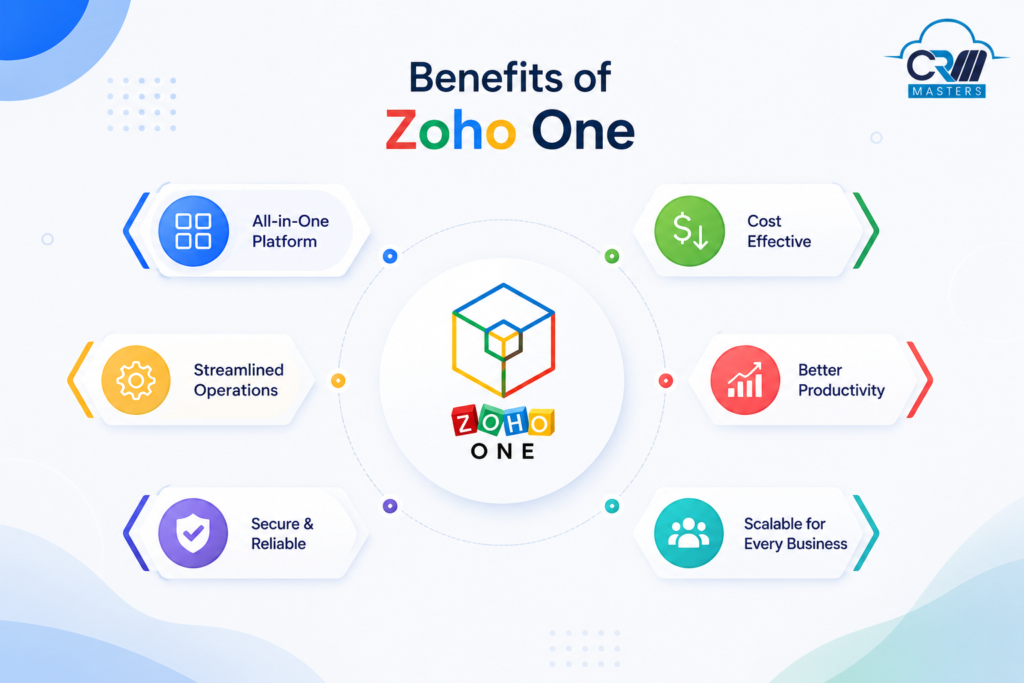
The main feature of Zoho One is to grow your business across the world. A few benefits of Zoho One are given below:
1. You can increase your Operational Efficiency of project management, sentiment analysis, help desk, and ticket tracking with the help of Zoho One Suite.
2. It energizes your support teams by creating multi-channel support to interact with your customers and address their needs.
3. Zoho One creates the right set of tools by empowering effective communication between teams or with customers, as it believes it is the core pillar of effective businesses.
4. Bring accountability to your accounting system from invoicing to order management to accounts, and organize your company’s financial processes.
5. You can run and engage market campaigns both online and offline by using the Zoho One app.
6. You can manage your Employees with care, find new talent, and schedule their interviews to onboard successful candidates with the help of Zoho’s HR management tools.
7. You can draw actionable insights for your business by using AI/Analytics.
What Apps are Included in Zoho One?
Zoho One covers a wide range of business functions, but not every application serves the same type of requirement. Some are designed for specific departments, while others support processes that span multiple teams. The following sections group the major Zoho One applications by business function and explain what each application is primarily used for. This makes it easier to identify the tools that are relevant to your business rather than treating the entire application catalogue as one package.
Let’s discuss the overview of the Zoho One application.
SALES
The Better experience begins with aligning all your teams and making sure they keep customers at the center of whatever they do.
Zoho CRM
Cloud-based CRM for managing your entire sales pipeline, leads, deals, contacts, accounts, and forecasting. Includes Zia AI for predictive lead scoring, deal health signals, and automated follow-up suggestions.
Zoho Bigin
All you require is Bigin to centralize your client activities on a single platform. It deals with sales, support tickets, customer onboarding, order fulfilment, customer testimonials, contracts, and everything in between that you require for your business.
Zoho Booking
Online appointment scheduling integrated with Google Calendar, Office 365, and Zoho CRM. Includes round-robin assignment, payment collection at booking, and automated reminders.
- Zoho CommandCenter
Customer journey orchestration tool that builds, automates, and refines customer journeys across every touchpoint, giving sales, marketing, and support teams a unified view of every customer interaction.
- Zoho TouchPoint
Zoho TouchPoint is a digital identity and customer engagement platform that connects physical and digital touchpoints with customer actions. Businesses can create NFC cards, digital business cards, dynamic QR codes, and interactive email signatures that direct customers to profiles, lead forms, appointment pages, websites, surveys, or other destinations. TouchPoint can also capture contacts and leads and push them to Zoho CRM for follow-up.
MARKETING
With the help of Zoho One, your marketing team can create a strong online presence, communicate effectively with customers, and maximize the effectiveness of your marketing budgets.
Zoho Marketing Automation
End-to-end marketing automation across email, social, and web channels. Build lead nurturing journeys, score leads automatically, and sync qualified leads directly to CRM.
Zoho Campaign
Campaigns help you to create attractive designs, customized messages, send emails, and connect with new customers. With the help of Zoho Campaigns, you can manage your emails and SMS from a single place.
- Zoho Publish
Zoho Publish helps businesses manage their online presence across multiple locations. It allows teams to manage Google Business Profiles, keep business information updated, monitor reviews, and improve visibility in local search. It is particularly useful for businesses with multiple branches that need to maintain consistent listings and manage customer interactions across locations.
Zoho Social
Social media management for Facebook, Instagram, LinkedIn, Twitter/X, and more. Schedule posts, monitor comments, generate engagement reports, and capture social leads into CRM.
Zoho Survey
Survey builder with 25+ question types, skip logic, and piping. Responses feed directly into Zoho Analytics for reporting.
Zoho Forms
Form builder with 30+ field types, conditional logic, and UTM tracking. Integrates with CRM to automatically create leads from form submissions.
Zoho Sites
Website builder with a visual editor, hosting, and SEO tools. Good for landing pages and microsites.
Zoho Page Sense
Conversion optimization: heatmaps, session recordings, scroll maps, and A/B tests to show exactly how users interact with each page.
Zoho Sales IQ
Website builder with a visual editor, hosting, and SEO tools. Good for landing pages and microsites.
Zoho Backstage
End-to-end event management for in-person and virtual events, registration, ticketing, agenda, and attendee engagement. 0% commission on ticket sales.
Zoho Commerce
Full-featured ecommerce platform: accepts orders, tracks inventory, processes payments, manages shipping, and provides analytics.
Zoho Thrive
A loyalty management and performance-based marketing platform to build loyalty programs, reward repeat customers, and run referral campaigns — all connected to your CRM data.
Zoho LandingPage
A dedicated builder for creating high-converting, SEO-optimized landing pages for campaigns. Includes a drag-and-drop editor, A/B testing, and direct integration with Zoho CRM and Campaigns.
CUSTOMER SUPPORT
Your support staff has access to a wide range of tools with Zoho One that can help them handle requests across channels and solutions and increase customer satisfaction.
Zoho Desk
Multi-channel help desk with ticket management, SLA automation, a knowledge base, and CSAT tracking. Agents see full CRM history without leaving Desk.
Zoho Assist
Remote desktop and device support. Access Windows, Mac, Linux, iOS, Android, or Chromebook devices anywhere in the world.
Zoho Lens
Augmented reality remote support for physical equipment. A technician shares their phone camera; a support agent guides them to resolution in real time.
COMMUNICATION
You have access to a wide range of tools with the communication application of Zoho One.
Zoho Mail
Ad-free business email with custom domain support, end-to-end encryption, and an internal chat layer (Streams) for discussing emails without forwarding chains.
Zoho Cliq
It helps you to create chat groups, channels, messages, files, images, videos, and more for your organization’s people. You can use your chats from any other Zoho app, like Zoho CRM.
COLLABORATION
It includes Projects, Connect, Learn, Teambox, and much more that help in your business.
Projects
It is a cloud-based project management application that can manage your projects, timesheets, and tasks easily. It is a flexible and easy-to-use application with a lot of customization features.
Connect
A private social network for your business is Zoho Connects, which allows all users to share data, including documents, photos, and videos. Also, you can create groups for employee forums, manuals, and business events.
Zoho Learn
Build articles, lectures, and courses with Zoho Learn. This application also helps you to train your staff. The worker may take a test when class is over. Your lessons can be created using pictures and videos.
Zoho TeamInbox
With the help of TeamInbox, it is easy to set up a business email account and share it with several users so that everyone has access to all the emails. From that inbox, the users may view and reply to any email, keeping everyone in the loop.
Zoho Meeting
The meeting allows you to have online meetings and broadcast webinars. It also connects with other Zoho products like CRM, mail, projects, and Connect.
Zoho WorkDrive
WorkDrive is a cloud-based application. With the help of WorkDrive, you can create folders, documents, spreadsheets, and presentations, and upload any files you want.
Zoho Vani
A visual collaboration platform for brainstorming, roadmap planning, and process mapping on an infinite canvas. Fully integrated with Zoho Projects for real-time team collaboration.
Zoho Sprints
Agile project management for development teams. Plan sprints, manage backlogs, track velocity, and monitor progress with burndown charts. Integrates with Zoho Projects for hybrid teams.
- Zoho Tables
Zoho Tables is a spreadsheet-database hybrid that helps teams organize data, track work, automate workflows, and create dashboards. It combines the flexibility of spreadsheets with the structure of a database, making it useful for managing projects, operational data, approvals, and other business workflows without requiring coding. Zoho Tables can also connect with Zoho CRM and other Zoho applications through integrations and Zoho Flow.
PRODUCTIVITY
It includes Writer, Sheet, Sign, Notebook, and Vault, which help you in various ways.
Zoho Writer
Word processor with real-time collaboration, mail merge with CRM, Zia-powered grammar suggestions, and offline editing.
Zoho Sheet
Spreadsheet application with pivot tables, data validation, and live connectors to Zoho Analytics.
Zoho Sign
Digital signature platform. Send documents for signature, track status, and receive signed copies automatically. Integrated with CRM, Desk, People, and Books.
Notebook
This is a note-taking application where you may share your notes for collaboration and add text, images, and voice. A few Zoho applications, including CRM, mail, meetings, Cliq, and projects, are integrated with it.
Zoho Vault
Enterprise password manager with role-based access controls so sensitive credentials are only accessible to authorized users.
Zoho Show
Presentation builder with broadcast mode for remote audiences and collaborative editing.
FINANCE
With the help of Finance, you can increase your business growth and maintain the accounts of your business.
Zoho Books
Zoho Books is accounting software that can help you to create and send invoices, register payments, and manage expenses.
Zoho Invoice
Books and invoices are comparable. You can manage your finances through invoices if you work for yourself or own a small business.
Zoho Expense
With the help of Zoho Expense, you can record expenses, check mileage, organize travel itineraries, and receive reimbursements.
Zoho Checkouts
You can create a payment page with Checkout to accept online payments anywhere.
Zoho Payroll
Payroll processing with federal and state tax compliance. Synced with Zoho People for headcount changes and Zoho Books for accounting entries.
OPERATIONS
It includes Inventory and subscriptions that help you with stock management, recurring invoices, and subscriptions.
Zoho Inventory
Stock management and order fulfillment. Track inventory levels, manage purchase orders, handle multi-warehouse operations, and integrate with eBay, Amazon, and Shopify.
Subscriptions
Recurring billing and subscription management. Create plans, handle upgrades and downgrades, and generate recurring invoices automatically.
HUMAN RESOURCES
It includes people and recruiters who manage your employee data and other activities.
Zoho People
Core HR platform covering employee records, onboarding, attendance, time tracking, shift scheduling, and performance management
- Zoho Recruit
Applicant tracking system for managing job postings, candidate pipelines, interview scheduling, and offer letters.
BUSINESS INTELLIGENCE
It includes Analytics, Creator, Flow, and Data prep that help you in analytics, application, and automate your business procedures.
Zoho Analytics
Self-service BI platform. Connect to any Zoho app or external data source, build dashboards, and share reports. Includes AI-powered insights via Zia.
- Zoho Creator
Low-code application builder. Build custom internal tools and workflows for processes that standard Zoho apps don’t cover natively.
Zoho Flow
No-code integration and workflow automation connecting Zoho apps with 600+ third-party services. Example: ‘Closed Won’ in CRM triggers a project in Projects and sends a Slack notification.
- Zoho DataPrep
AI-powered data cleaning before CRM migrations or imports. Teams using DataPrep report 75–80% reduction in data preparation time.
Zoho RPA
Automates repetitive, rule-based tasks using software bots — no coding required. Ideal for finance, HR, and operations teams handling high volumes of manual data entry.
- Zoho Apptics
Zoho Apptics is a product analytics platform that helps businesses understand how users interact with their web, mobile, and desktop applications. Teams can monitor app performance and stability, analyze user journeys, collect feedback, manage app reviews, and identify opportunities to improve user engagement. Zoho One customers get access to the Apptics Pro plan as part of their subscription.
LEGAL
It includes Contracts Management that reduces your business risk.
Zoho Contracts
It is a comprehensive Contract management application that helps to streamline the contract lifecycle, reduce business risk, and much more.
Zoho Sign
A digital signature platform to send, track, and receive signed documents. Legally compliant with eIDAS, ESIGN, and IT Act. Integrates with CRM, Books, Desk, and People.
SECURITY
Zoho Log360 Cloud
A cloud-based log management and security monitoring application that helps organizations detect, investigate, and respond to security events. Zoho added Log360 Cloud to Zoho One in February 2025.
Zoho OneAuth
Multi-factor authentication app that secures your Zoho One account with push notifications, QR codes, or OTPs — ensuring only authorized users access your business data.
What’s New in Zoho One in 2026?
Zoho One continued to expand its application ecosystem in 2026, adding new capabilities across customer engagement, product analytics, work management, and local marketing.
- Zoho TouchPoint
Zoho TouchPoint brings digital and physical customer touchpoints into Zoho One. Businesses can use NFC cards, digital cards, QR codes, and interactive email signatures to connect customers with lead forms, appointment pages, websites, profiles, and other destinations. It also supports contact and lead capture with Zoho CRM integration.
- Zoho Apptics
Zoho Apptics adds product analytics to Zoho One, helping teams monitor application performance, analyze user journeys, collect feedback, manage app reviews, and understand user engagement across web, mobile, and desktop applications.
- Zoho Tables
Zoho Tables adds a flexible workspace for organizing data, tracking work, automating workflows, and building dashboards. It combines spreadsheet-style usability with database capabilities and is included in Zoho One at no additional cost.
- Zoho Publish
Zoho Publish adds local business presence management to Zoho One. Businesses can manage Google Business Profiles, maintain location information, monitor reviews, and improve their visibility in local search results.
Spaces UI
A new workspace layer that organizes Zoho One into three distinct environments: personal space (individual tasks and tools), organizational space (company-wide resources), and functional space (department-specific views). Users switch between spaces without losing context.
Enhanced Dashboards
Custom widgets pull live data from across the entire Zoho One suite. An operations manager can now see their sales pipeline, open support tickets, and bank balance on one screen without opening 10 tabs.
Zia AI Agents
Zoho’s Zia LLM (custom large language model) now powers 40 pre-built AI agents across HR, CRM, and finance, plus a no-code Zia Agent Studio for building custom agents. Key distinction: a Zia AI assistant responds when prompted; a Zia AI agent actively monitors conditions and takes action autonomously (e.g., flagging at-risk deals before a rep notices, or auto-approving invoices below a set threshold).
How Does Zoho One Compare to Competitors?
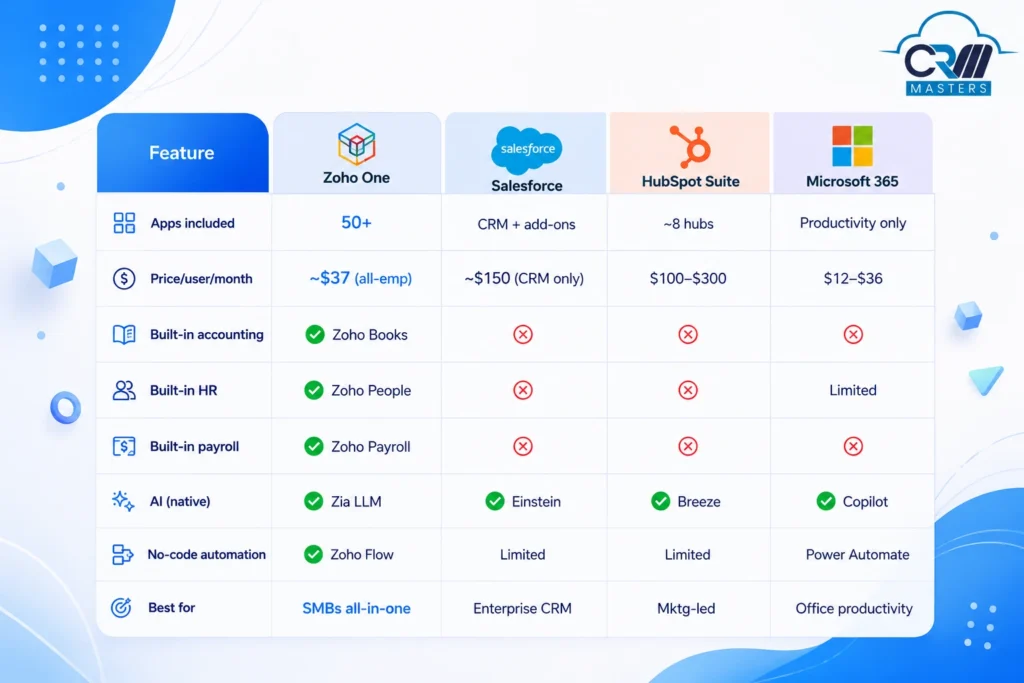
Honest caveat: Zoho One requires setup investment. The platform is powerful, but implementing it without the right structure leads to messy data and underutilization. Most businesses only use 10–20% of what Zoho can do — not because the software is limited, but because it needs to be configured around your workflows.
Who Is Zoho One Best For?
Best fit when:
- You are running 3+ separate SaaS tools that don’t talk to each other
- Your team manually transfers data between departments (sales to finance, support to CRM)
- You want a single vendor relationship and a unified data model
- Your business has 10–500 employees and wants enterprise-grade capability without enterprise pricing
May not be the best fit if:
- You need a best-in-class point solution (e.g., Salesforce for a 500-person sales org with deep native integrations)
- You have no appetite for structured implementation — plug-and-play is not how Zoho One works
- Your primary need is Microsoft Office compatibility at scale
Which Zoho One Apps Should You Use Together?
The value of Zoho One is not in using as many applications as possible. It comes from selecting applications that support the same business process and defining how information should move between them.
Here are some practical combinations:
- Sales + Finance: Zoho CRM + Zoho Books + Zoho Inventory
Useful for connecting the sales pipeline with quotations, invoicing, payments, and order or inventory management.
- Marketing + Sales: Zoho Campaigns + Zoho Forms + Zoho Marketing Automation + Zoho CRM
This combination can help capture leads, nurture them, and pass qualified prospects into the sales pipeline.
- Customer Support + Sales: Zoho Desk + Zoho CRM
Support teams can work with customer information and sales context, while customer-facing teams get better visibility into ongoing support interactions.
- Projects + Finance: Zoho Projects + Zoho Books + Zoho Expense
Useful for businesses that need to connect project delivery with timesheets, expenses, billing, and financial tracking.
- HR + Operations: Zoho People + Zoho Recruit + Zoho Payroll
This combination can connect recruitment and employee management with attendance, payroll, and other workforce processes.
- Analytics across departments: Zoho Analytics + relevant operational apps
Analytics can bring data from CRM, finance, support, marketing, and other systems into dashboards for cross-functional reporting.
The right combination depends on your workflow, not the number of applications you can activate. Start with the processes that create the most manual work or require frequent data sharing, then build the application stack around them.
How Do You Get Started with Zoho One?
The most common mistake is activating Zoho One and trying to configure it without a clear plan. The result: teams get stuck, data gets messy, and the all-in-one platform starts feeling like a DIY project.
A practical starting approach:
- Start with 3–5 core apps, typically CRM, Books, Mail, and one department-specific tool.
- Map your workflows before you configure, know how a lead becomes a customer and how a deal becomes an invoice before touching settings.
- Clean your data first, use Zoho DataPrep before any CRM migration. Dirty data in means dirty data out.
- Expand horizontally, once core apps are stable, add the next layer. Zoho One’s admin console makes adding new apps straightforward.
- Partner with a certified Zoho consultant, experienced implementation partners reduce deployment time and help you get ROI faster.
Conclusion
Zoho One is an all-in-one software suite that offers more than 50+ business applications that are designed to help companies streamline their operations and improve their productivity. These applications cover a wide range of business needs, including sales, marketing, customer support, finance, HR, and many more.
With Zoho, one business can reduce its software costs and avoid the hassle of managing software solutions. This process becomes easier with CRM Masters, as we are the Certified Zoho Implementation Partner, equipped with the expertise and knowledge to provide comprehensive Zoho solutions to businesses of all sizes.
Need Help Implementing Zoho One?
As a Zoho Premium Partner, we help businesses implement, customize, and integrate Zoho One to streamline operations and accelerate growth. Get expert guidance tailored to your business needs.