





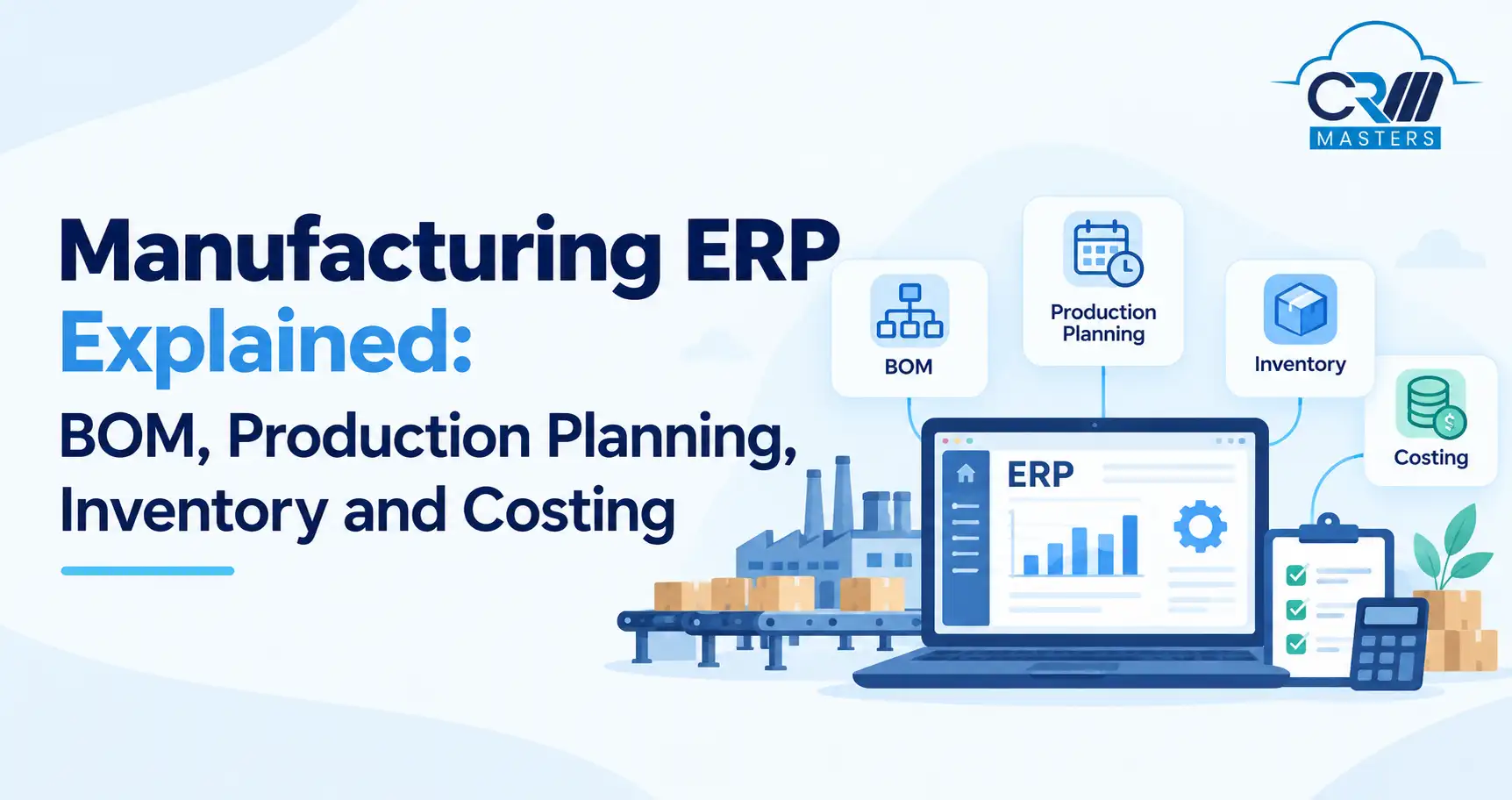
Manufacturing ERP Explained: BOM, Production Planning, Inventory and Costing
Manufacturing businesses need to manage raw materials, production schedules, inventory, finished goods, and costs. When businesses manage these activities separately, they may face material shortages, production delays, excess inventory, and inaccurate costing.
Manufacturing ERP software connects these activities in one system, helping businesses plan production, track materials, monitor costs, and make better decisions.
In this guide, you will learn what manufacturing ERP is, how a Bill of Materials (BOM) works, the different types of BOM, and how ERP connects production with inventory and accounting.
Key Points
What Is Manufacturing ERP?
Manufacturing ERP software helps businesses manage and connect manufacturing operations, including purchasing, inventory, production planning, quality management, sales, and accounting.
For example, a furniture manufacturer can use ERP software to check raw material availability, plan production, record material consumption, track finished products, and calculate manufacturing costs.
How Does Manufacturing ERP Work?
A typical manufacturing process follows these steps:
- Customer Order or Demand: The business identifies how many products are needed.
- Material Planning: The system checks available inventory and calculates material requirements.
- Purchasing: Missing materials can be planned for procurement.
- Production Planning: The business schedules production activities, resources, and machines.
- Production Execution: Workers manufacture products and record material usage and output.
- Inventory Update: Finished goods are recorded in stock.
- Costing and Accounting: The business tracks production costs and relevant financial transactions.
The exact workflow depends on the ERP system and the company’s manufacturing process.
What Is a Bill of Materials (BOM)?
A Bill of Materials (BOM) is a structured list of the materials, components, and quantities required to manufacture a product.
For example, a simple office chair BOM could include:
This example shows the basic components of one chair. A real BOM may also include subassemblies, material specifications, units of measure, and other production details.
A BOM helps businesses calculate material requirements, plan purchases, manage inventory, and estimate product costs.
What Are the Different Types of BOM?
BOM terminology can vary between ERP systems. The following are common BOM structures and classifications.
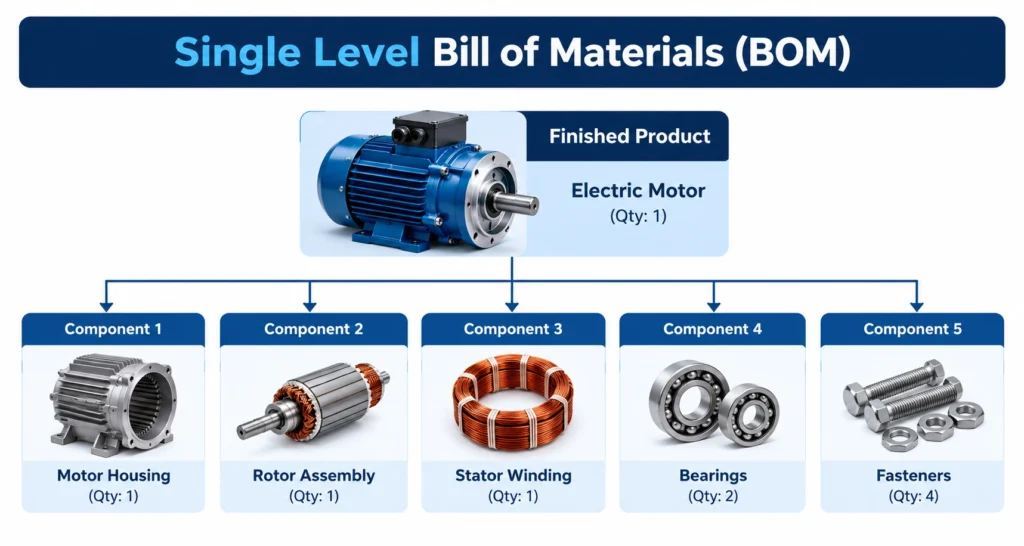
1. Single-Level BOM
Lists the immediate components required to make a product. It is useful for simple products with few components.
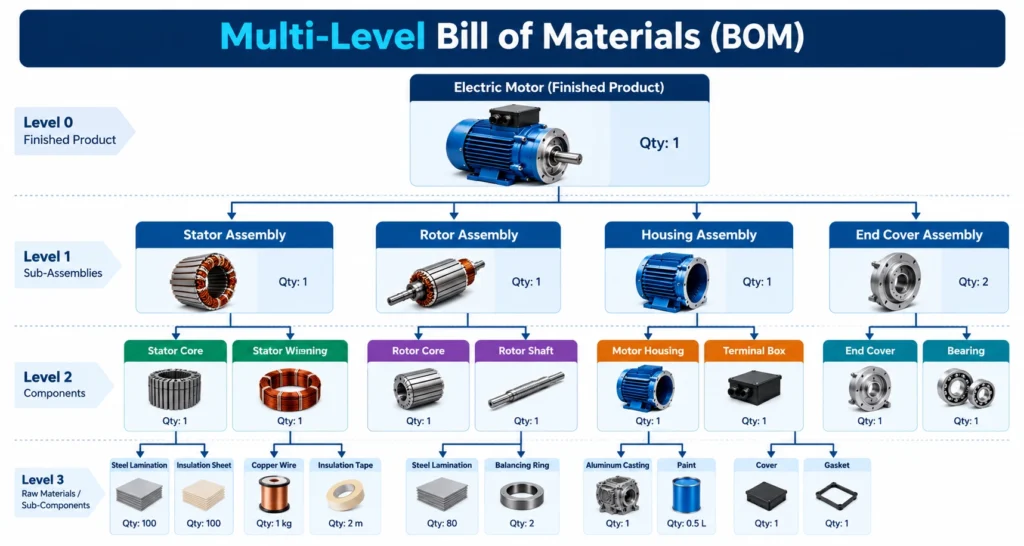
2. Multi-Level BOM
Shows components and subassemblies across multiple levels. For example, a chair may contain a seat assembly that includes several smaller components.
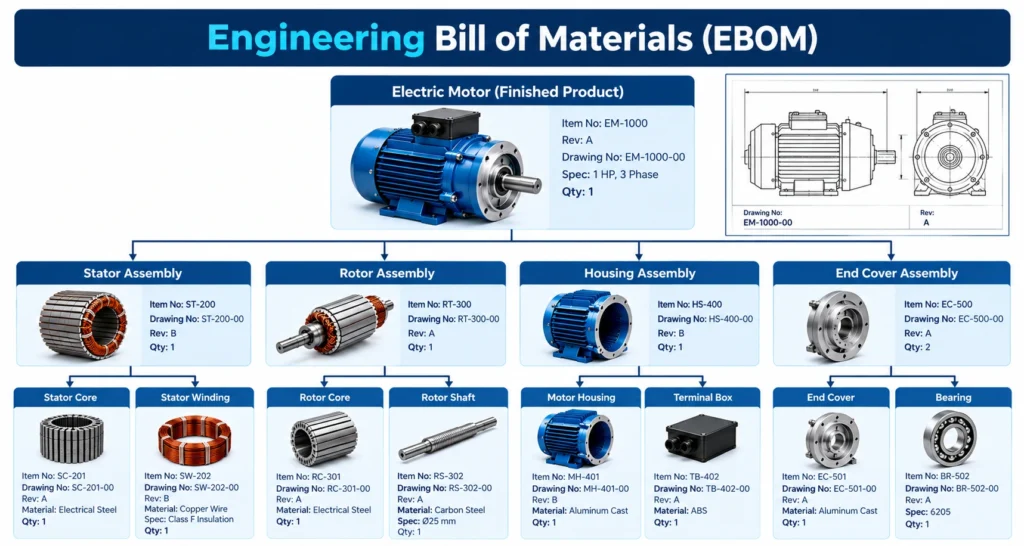
3. Engineering BOM (EBOM)
Represents the product from an engineering and design perspective, including its designed components and structure.
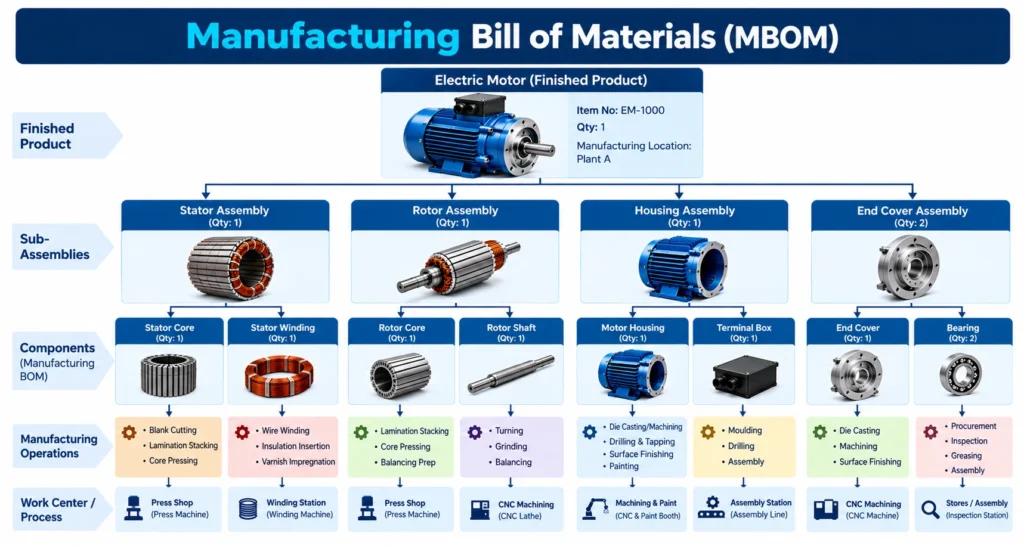
4. Manufacturing BOM (MBOM)
Organizes the materials and components needed to manufacture the product, according to the production process.
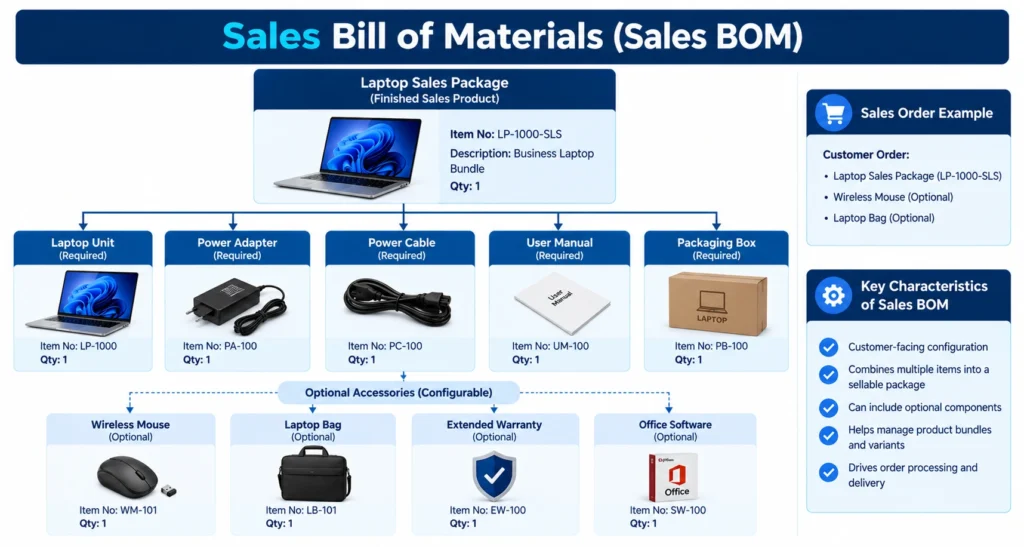
5. Sales BOM
Groups a product with the items or components included in a sales offering. Its behavior depends on the ERP system.
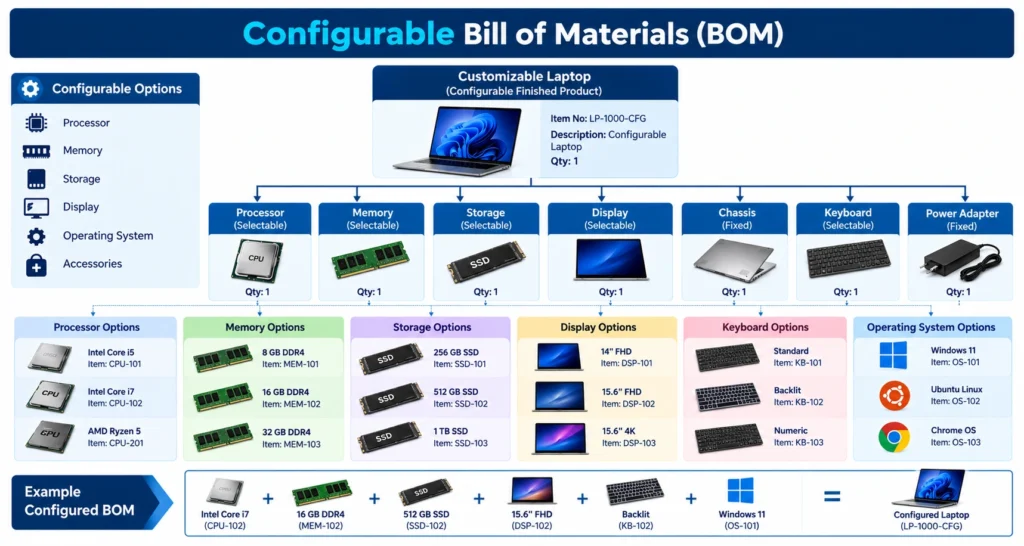
6. Configurable BOM
Supports products that can be manufactured with different options, such as different sizes, colours, or component combinations.
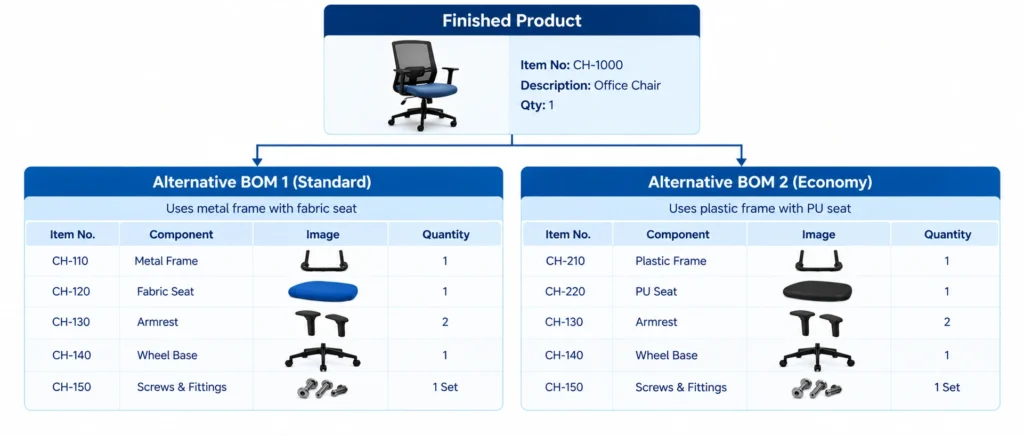
7. Alternative BOM
Provides an alternative material structure for a product when supported by the ERP system and manufacturing setup.
Important: BOM types are not identical across all ERP platforms. A business should select the structure that matches its products, production process, and software capabilities.
What Is the Difference Between BOM, Routing, and Production Order?
These three concepts work together but serve different purposes.
- BOM: Defines what materials and components are required.
- Routing: Defines the operations and sequence of activities required to manufacture the product.
- Production order: Specifies what quantity to produce, where and when to produce it, and the resources and materials needed for the order.
For example, a BOM lists the components for a chair, the routing defines assembly and inspection steps, and the production order instructs the factory to manufacture 100 chairs. Together, these elements support production planning and execution.
How Does ERP Manage Inventory and Production Costing?
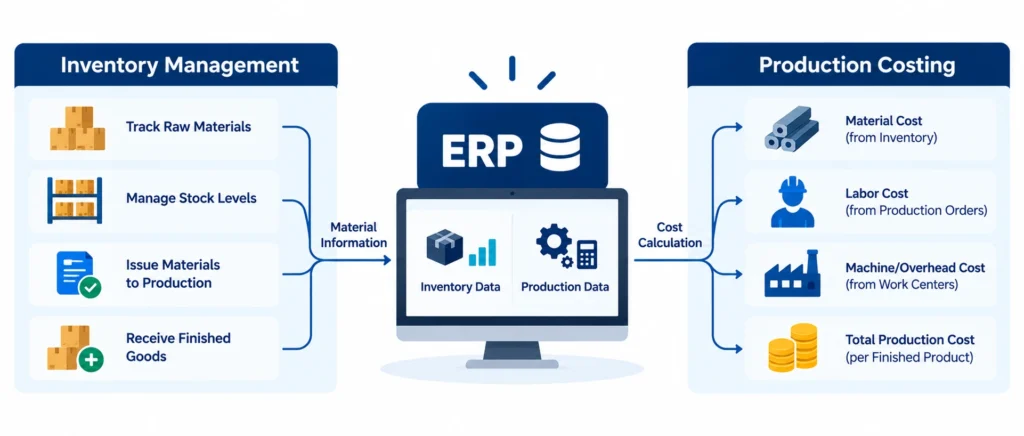
Manufacturing ERP connects material usage, production output, inventory, and costing. During production, raw materials may be issued to a production order. As manufacturing progresses, the business records labour, machine activity, output, and other relevant costs according to its ERP setup.
The system can help track:
- Raw materials: Components and materials available for production.
- Work-in-progress (WIP): Products that have entered production but are not yet complete.
- Finished goods: Completed products available for storage or sale.
- Material wastage and yield: Differences between expected and actual material usage or output, where these are recorded.
- Production costs: Material, labour, and applicable overhead costs.
ERP costing can also help compare planned or standard costs with actual costs. This allows businesses to investigate cost differences and identify opportunities to improve efficiency.
How Does SAP S/4HANA Support Manufacturing?
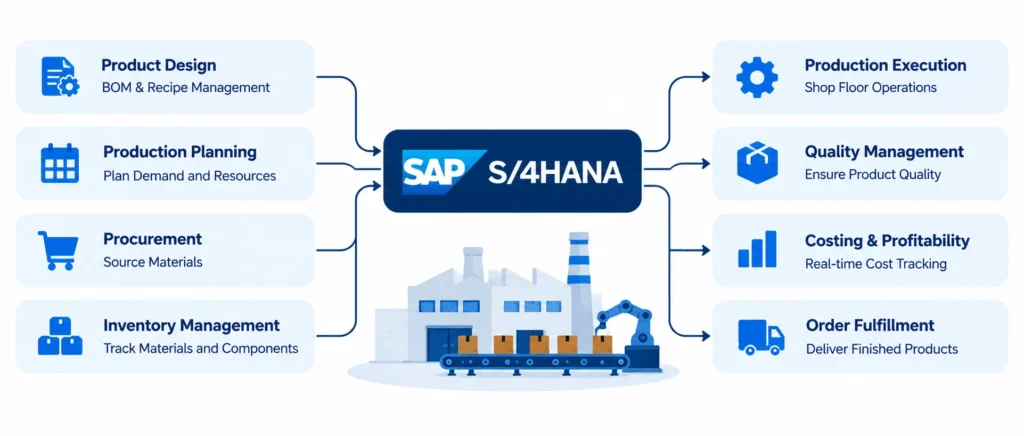
SAP S/4HANA supports manufacturing processes by connecting production planning, material management, inventory, production orders, and financial accounting. Depending on the configuration, manufacturers can use SAP to manage BOMs, plan material requirements, execute production orders, record goods movements, and analyze production costs. For businesses considering SAP, the appropriate solution depends on factors such as manufacturing complexity, company size, existing systems, and reporting requirements.
What Are the Benefits of Manufacturing ERP?
Manufacturing ERP can help businesses:
- Improve material planning and inventory visibility.
- Reduce avoidable production delays.
- Coordinate purchasing and manufacturing.
- Track production progress and material consumption.
- Understand planned and actual production costs.
- Improve coordination between operations and accounting.
- Make decisions using more consistent business data.
These benefits depend on accurate data, well-defined processes, and effective implementation.
Conclusion
Manufacturing ERP connects the key activities involved in turning raw materials into finished products. The BOM defines what is required, routing explains how production takes place, and production orders help organize and track manufacturing work.
By connecting these activities with inventory and costing, ERP software helps manufacturers improve visibility and make more informed operational decisions.
Looking to improve your business processes with ERP and connected business systems? Explore the solutions and services available through CRM-Masters.com.


FAQ
Q1. What is manufacturing ERP software?
Ans. Manufacturing ERP software connects production planning, purchasing, inventory, manufacturing operations, and costing in one business system.
Q2. What is BOM in manufacturing?
Ans. A Bill of Materials is a structured list of the components, raw materials, and quantities required to manufacture a product.
Q3. What is the difference between EBOM and MBOM?
Ans. An EBOM represents the product from an engineering perspective, while an MBOM organizes the materials and components needed for manufacturing.
Q4. Why is BOM important in ERP?
Ans. A BOM helps the ERP system calculate material requirements, support purchasing and production planning, and estimate product costs.
Q5. Can SAP manage BOM and production orders?
Ans. Yes. SAP manufacturing functionality supports BOM management and production orders. Available capabilities depend on the SAP product, configuration, and business requirements.
Q6. How does manufacturing ERP help control costs?
Ans. Manufacturing ERP can help track material consumption, production output, labour, overheads, and cost variances. This information helps businesses identify inefficiencies and understand manufacturing costs.








